OpenProject 17.4 has been released and as announced in our blog, the Jira Migrator is now available without feature flag and allows the migration of basic custom fields. This is a great step towards a full functioning Jira migration, on which the OpenProject team is currently working on. Version 17.4 also introduces Backlog buckets and more improvements to agile project management.
In this article, we highlight the most important changes and what they mean for your daily work. And, as always, please see our release notes that contain all changes, features and bug fixes.
A quick article navigation:
- Jira Migrator
- Agile improvements: Backlog buckets, better drag & drop and more
- Other great improvements with OpenProject 17.4
Jira Migrator
Most of you are aware that the Jira Data Center will reach the end of life (EOL) on 28 March 2029. After this date, Data Center licenses and apps will expire and become read-only, meaning that cloud hosting will be the only supported option. So teams around the world are searching for a Jira alternative: A highly functional tool that provides flexible hosting options and allows them full control over their data.
However, migrating to a new tool can present challenges ranging from time-consuming tasks to complex technical problems. That is why OpenProject is developing a tool that will make the transition effortless: The Jira Migrator. This ready-to-use solution allows teams to migrate their data from Jira to OpenProject with an easy, user-friendly dialogue. For more details, please refer to our documentation on the Jira Migrator.
With the release of OpenProject 17.4, the Jira Migrator is available without feature flag, but still in a beta version — we encourage you to test it and give us feedback, but we do not recommend using it in production environments. However, this step represents a major milestone for us, as it will enable us to encourage even more people to try out the Jira Migrator.

We understand the importance of the Jira Migrator being fully usable, which is why we have made it an integral part of our roadmap. With every release, we introduce new features and improvements to make migration as easy as possible for as many teams as possible.
For exclusive insights on the Jira Migrator and all Jira migration topics, please contact us and we will put you on the dedicated newsletter list. You can also follow us on social media to get the latest OpenProject news.
New with 17.4: Jira Migrator imports basic custom fields
The key new feature in 17.4 is that it is now possible to migrate custom fields from Jira to OpenProject. This applies to custom files that have a corresponding field type in OpenProject, such as text, numbers, dates, and select lists.

This is another important step on our way to providing a comprehensive and user-friendly migration wizard for Jira. The ability to transfer custom fields is a key feature here, as it enables organizations and teams with highly customized project management setups to make the transition with little effort.
To make a migration as easy as possible, there is not only the need for great software but also for a reliable guide on how to use it. We provide you with a detailed instruction manual that guides you step by step through the migration dialogue and explains every function in depth.
Already with previous versions, it was possible to migrate projects, issues (with name, title, description, attachments), users (with name, email, project membership), statuses, and types from Jira to OpenProject. And there is much more to come! We are continuously working on improving the Jira Migrator by adding new data types and improving the migration process itself.
In support of our development process for the Jira Migrator, we are collecting anonymized data samples to test and validate import capacities under real conditions. Please contact us if you want to donate your data; we will sign an NDA to ensure confidentiality.
Agile improvements: Backlog buckets, better drag & drop and more
As we at OpenProject operate using agile workflows ourselves, we understand how important intuitive usability and reliable features are for simplifying workload management.
In this release, we are focusing on speeding up the organization of the backlog and sprint planning process by providing backlog buckets and improved backlog interactions to simplify workflows for agile teams in OpenProject. Individual customization options are particularly important to us, as they support the specific needs of agile teams.
This release is part of our ongoing goal to support agile work in OpenProject, which we also outlined in our recent blog article “The future of agile work”.
Organizing with Backlog buckets
With a long and unstructured backlog, it becomes difficult to keep track of work packages and plan the next sprint efficiently. Without a clear overview, teams often spend too much time searching for items and switching between views.
With OpenProject 17.4, we introduce Backlog buckets, a new way to structure your backlog. Work packages can now be grouped into clearly defined lists, making it easier to organize and prioritize upcoming work. Within each bucket, work packages can be sorted and adjusted as priorities change. Each bucket can be named individually, allowing teams to create categories that fit their workflow.
Backlog buckets guarantee an organized backlog, structured into manageable sections. Teams and sprint planners are able to group by their specific needs, making it easier to plan and prioritize their work.

Improved backlog interactions for faster planning
Working with large backlogs requires quick and efficient interactions. When moving work packages or checking details takes too many steps, planning becomes slow and fragmented.
With OpenProject 17.4, we improved how you interact with the Backlogs module. Work packages are now fully draggable, making it easier to move them during backlog refinement and sprint planning. At the same time, you can still open work packages in a side panel with a single click, allowing you to view and edit details without losing context.
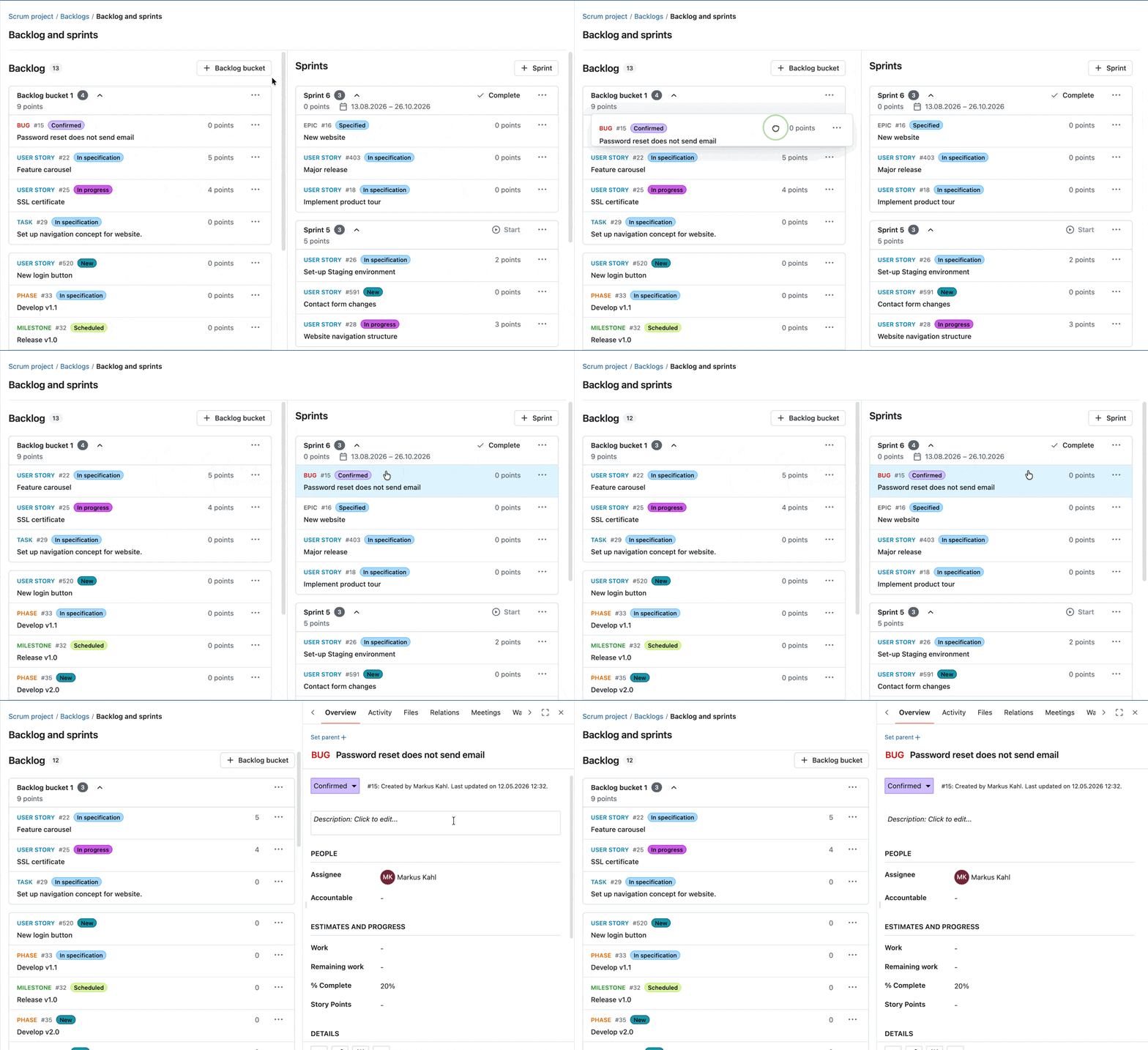
These improvements help you move seamlessly between planning and execution, making backlog refinement faster and more intuitive.
New action button in the sprint header
With OpenProject 17.4, you can now start or complete sprints directly from the sprint header using dedicated action buttons. This makes these actions easier to access and improves the visibility of what you can do next in your sprint workflow.

Please also look at our documentation to learn more about OpenProject’s Backlogs module.
Other great improvements with OpenProject 17.4
OpenProject 17.4 offers more features and updates. To keep this article concise, here is a quick look at some additional improvements worth highlighting:
Copy workflow settings between roles
Project workflow settings can now be copied from one role to other roles with a dedicated dialog. This makes it easier to apply consistent workflows across roles and reduces manual configuration effort.
“My Meetings” widget on the Home and Project Overview pages
A new “My meetings” widget now shows your upcoming meetings directly on the Home page. It displays the most relevant information at a glance and allows you to quickly access upcoming meetings.
OpenProject 17.4: Migration, installation, updates and support
Follow the upgrade guide for the packaged installation or Docker installation to update your OpenProject installation to OpenProject 17.4. We update your hosted OpenProject environments (Enterprise cloud) today, May 13, 2026.
You will find more information about all new features and changes in our Release notes and in the OpenProject Documentation.
If you need support, you can post your questions in the Community Forum, or if you are eligible for Enterprise support, please contact us and we will be happy to support you personally.
- New to OpenProject? To test all features of OpenProject 17.4 right away, create a 14 days free trial instance for our OpenProject Enterprise cloud.
- Prefer to run OpenProject 17.4 in your own infrastructure? Here you can find the Installation guidelines for OpenProject.
- Want to upgrade from a Community version to try out the Enterprise add-ons? Get a 14 days free trial token to test the Enterprise add-ons (all plans).
Credits
A very special thank you goes to Helmholtz-Zentrum Berlin, City of Cologne, Deutsche Bahn and ZenDiS for sponsoring released or upcoming features. Your support, alongside the efforts of our amazing Community, helps drive these innovations. Also a big thanks to our Community members for reporting bugs and helping us identify and provide fixes. Special thanks for reporting and finding bugs go to Andreas H., Madhu Reddy, and Anna Mund.
We also want to thank Community contributor K. Uihlein for contributing to our documentation of the OpenProject GitLab Integration. This is much appreciated.
Last but not least, we are very grateful for our very engaged translation contributors on Crowdin, who translated quite a few OpenProject strings! This release we would like to particularly thank the following users:
- Samo, for a great number of translations into Turkish.
- NCAA, for a great number of translations into Danish.
- Christophe Gesché, for a great number of translations into French.
Would you like to help out with translations yourself? Then take a look at our translation guide and find out exactly how you can contribute. It is very much appreciated!
As always, we welcome any feedback on this release.