OpenProject 17.4 wurde veröffentlicht und wie in unserem Blog angekündigt, ist der Jira Migrator jetzt ohne Feature Flag verfügbar und ermöglicht die Migration von grundlegenden einfachen Feldern. Dies ist ein großer Schritt in Richtung einer voll funktionsfähigen Migrationsmöglichkeit für Jira, an der das OpenProject-Team derzeit arbeitet. Version 17.4 führt außerdem Backlog buckets und weitere Verbesserungen für das agile Projektmanagement ein.
In diesem Artikel stellen wir die wichtigsten Änderungen vor und erläutern, was sie für Ihre tägliche Arbeit bedeuten. Wie immer finden Sie alle Änderungen, Funktionen und Fehlerbehebungen in unseren Release Notes.
Eine kurze Navigation durch den Artikel:
- Jira Migrator
- Verbesserungen für das agile Arbeiten: Backlog buckets, verbessertes Drag & Drop und mehr
- Weitere Verbesserungen mit OpenProject 17.4
Jira Migrator
Viele von Ihnen wissen, dass das Jira Data Center voraussichtlich am 28. März 2029 auslaufen wird (EOL). Nach diesem Datum laufen die Data Center-Lizenzen und Anwendungen aus und werden schreibgeschützt, sodass Cloud-Hosting die einzige unterstützte Option bleibt. Daher suchen Teams weltweit nach einer Alternative zu Jira: nach einem leistungsfähigen Tool, das flexible Hosting-Optionen bietet und ihnen die volle Kontrolle über ihre Daten ermöglicht.
Eine Migration auf ein neues Tool kann jedoch eine Reihe von Herausforderungen mit sich bringen, die von zeitaufwendigen Aufgaben bis hin zu komplexen technischen Problemen reichen. Aus diesem Grund entwickelt OpenProject ein Tool, das den Umstieg erleichtern soll: den Jira Migrator. Mit dieser fertigen Lösung können Teams ihre Daten über einen einfachen, anwendungsfreundlichen Dialog von Jira nach OpenProject migrieren. Weitere Einzelheiten finden Sie in unserer Dokumentation zum Jira Migrator.
Mit der Veröffentlichung von OpenProject 17.4 ist der Jira Migrator ohne Feature Flag verfügbar, befindet sich aber weiterhin in einer Beta-Version. Wir möchten Sie ermutigen, ihn zu testen und uns Feedback zu geben, raten aber derzeit davon ab, ihn in Produktionsumgebungen einzusetzen. Dieser Schritt ist jedoch ein wichtiger Meilenstein für uns, da wir so noch mehr Menschen dazu motivieren können, den Jira Migrator auszuprobieren.

Uns ist bewusst, wie wichtig es ist, dass der Jira Migrator vollständig nutzbar wird. Aus diesem Grund haben wir ihn zu einem festen Bestandteil unserer Roadmap gemacht. Mit jedem neuen Release führen wir neue Funktionen und Verbesserungen ein, um die Migration für möglichst viele Teams so einfach wie möglich zu gestalten.
Wenn Sie exklusive Einblicke in den Jira Migrator und alle Jira-Migrationsthemen erhalten möchten, nehmen Sie bitte Kontakt auf und wir setzen Sie auf unsere spezielle Newsletter-Liste. Folgen Sie uns gern auch in den sozialen Medien, um alle Neuigkeiten rund um OpenProject zu erhalten.
Neu mit OpenProject 17.4: Jira Migrator importiert grundlegende selbstdefinierte Felder
Die wichtigste neue Funktion in 17.4 ist, das sich nun selbstdefinierte Felder von Jira zu OpenProject migrieren lassen. Dies gilt für selbstdefinierte Felder, die in OpenProject einen entsprechenden Feldtyp haben, etwa Text, Zahlen, Datumsangaben und Auswahllisten.

Das ist ein weiterer wichtiger Meilenstein auf unserem Weg, einen umfassenden und anwendungsfreundlichen Migrationsassistenten für Jira bereitzustellen. Die Möglichkeit, selbstdefinierte Felder zu übertragen, ist dabei eine zentrale Funktion, da sie es Organisationen und Teams mit stark angepassten Projektmanagement-Setups einen Umstieg mit geringem Aufwand ermöglicht.
Um die Migration so einfach wie möglich zu gestalten, brauchen Sie nicht nur eine gute Software, sondern auch einen zuverlässigen Leitfaden für ihre Verwendung. Wir stellen Ihnen eine ausführliche Anleitung zur Verfügung, die Sie Schritt für Schritt durch den Migrationsdialog führt und jede Funktion im Detail erklärt.
Bereits mit den vorherigen Versionen war es möglich, Projekte, Issues (mit Name, Titel, Beschreibung, Anhängen), Nutzer:innen (mit Name, E-Mail, Projektmitgliedschaft), Status und Typen von Jira nach OpenProject zu migrieren. Und es kommt noch mehr! Wir arbeiten kontinuierlich daran, den Jira Migrator zu verbessern, indem wir neue Datentypen hinzufügen und den Migrationsprozess selbst weiterentwickeln.
Zur Unterstützung unseres Entwicklungsprozesses für den Jira Migrator sammeln wir anonymisierte Datensätze, um die Importkapazität unter realen Bedingungen zu testen und zu validieren. Bitte kontaktieren Sie uns, wenn Sie Ihre Daten für uns zur Verfügung stellen möchten. Selbstverständlich unterzeichnen wir eine NDA, um die Vertraulichkeit sicherzustellen.
Verbesserungen für das agile Arbeiten: Backlog buckets, verbessertes Drag & Drop und mehr
Da wir bei OpenProject selbst in agilen Workflows arbeiten, wissen wir, wie wichtig eine intuitive Bedienung und zuverlässige Funktionen für eine effiziente Aufgabenverwaltung sind.
In dieser Version konzentrieren wir uns darauf, die Organisation des Backlogs und den Prozess der Sprint-Planung zu beschleunigen. Dazu führen wir Backlog buckets und verbesserte Interaktionen im Backlog ein, um die Workflows agiler Teams in OpenProject zu vereinfachen. Individuelle Anpassungsmöglichkeiten sind uns dabei besonders wichtig, da sie die spezifischen Bedürfnisse agiler Teams unterstützen.
Dieses Release ist Teil unseres fortlaufenden Ziels, agiles Arbeiten in OpenProject zu unterstützen. Dieses haben wir auch in unserem kürzlich erschienenen Blog-Artikel “Die Zukunft des agilen Arbeitens” näher beschrieben.
Organisation mit Backlog buckets
Bei einem langen und unstrukturierten Backlog wird es schwierig, den Überblick über Arbeitspakete zu behalten und den nächsten Sprint effizient zu planen. Ohne klare Übersicht verbringen Teams oft zu viel Zeit damit, nach Einträgen zu suchen und zwischen Ansichten zu wechseln.
Mit OpenProject 17.4 führen wir Backlog buckets ein, die eine neue Möglichkeit bieten, Ihr Backlog zu strukturieren. Arbeitspakete lassen sich nun in klar definierten Listen gruppieren, was die Organisation und Priorisierung der anstehenden Arbeit erleichtert. Innerhalb jedes Buckets können Arbeitspakete sortiert und angepasst werden, wenn sich die Prioritäten ändern. Jeder Bucket lässt sich zudem individuell benennen, sodass Teams Kategorien anlegen können, die zu ihrem Workflow passen.
Backlog buckets sorgen für ein organisiertes Backlog, das in überschaubare Abschnitte gegliedert ist. Teams und Sprint-Planer:innen können nach ihren spezifischen Anforderungen gruppieren und so ihre Arbeit einfacher planen und priorisieren.

Verbesserte Interaktionen im Backlog für eine schnellere Planung
Die Arbeit mit umfangreichen Backlogs erfordert schnelle und effiziente Interaktionen. Wenn das Verschieben von Arbeitspaketen oder das Prüfen von Details zu viele Schritte benötigt, wird die Planung langsam und fragmentiert.
Mit OpenProject 17.4 haben wir die Interaktion mit dem Backlogs-Modul verbessert. Arbeitspakete lassen sich nun vollständig per Drag & Drop verschieben, was die Arbeit während des Backlog-Refinements und der Sprint-Planung erleichtert. Gleichzeitig können Sie Arbeitspakete weiterhin mit einem einzigen Klick in einem Seitenpanel öffnen und so Details ansehen und bearbeiten, ohne den Kontext zu verlieren.
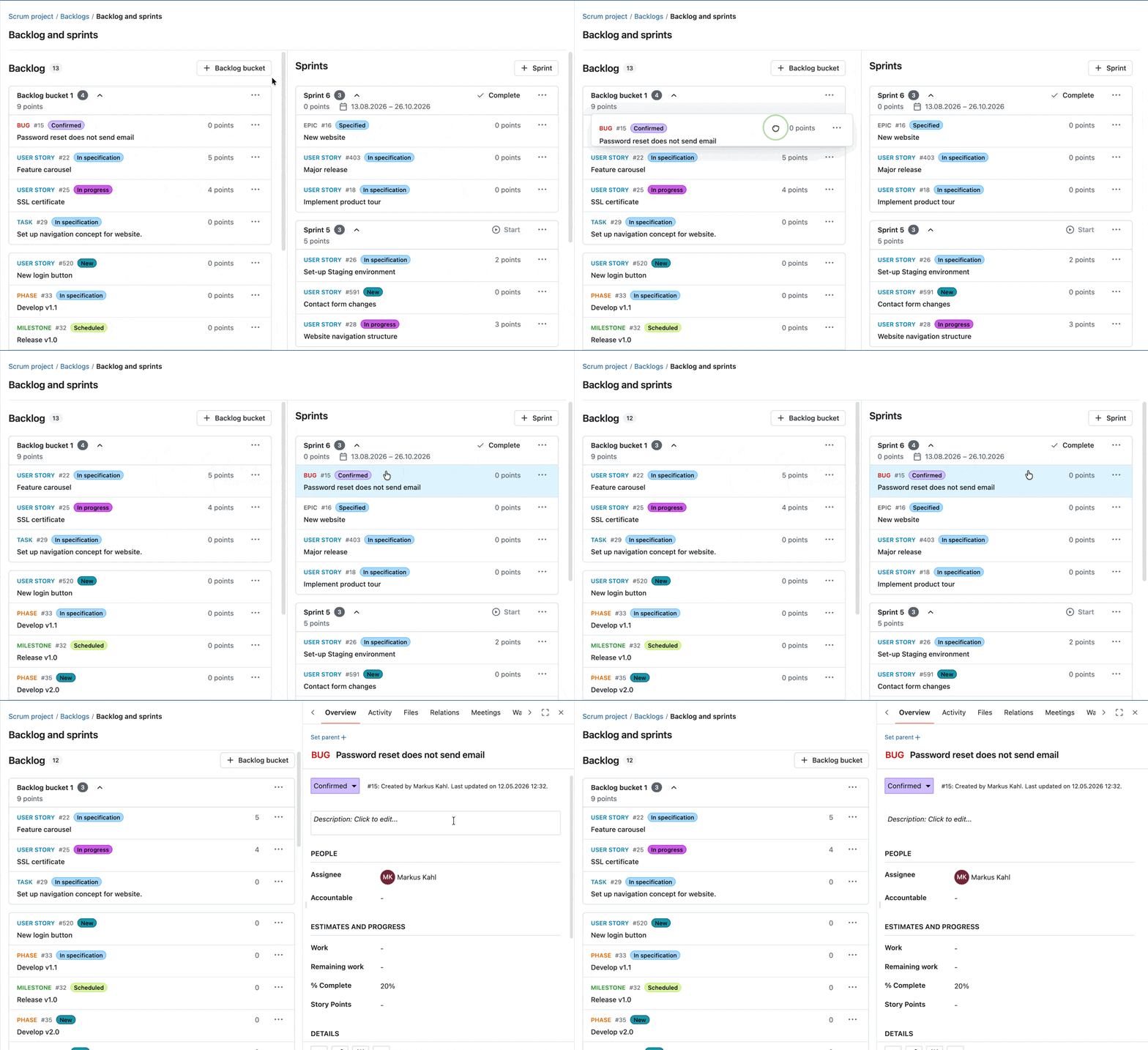
Diese Verbesserungen helfen Ihnen, nahtlos zwischen Planung und Umsetzung zu wechseln, und machen das Backlog-Refinement schneller und intuitiver.
Neuer Button im Sprint Header
Mit OpenProject 17.4 können Sie Sprints nun direkt über den Sprint Header starten oder abschließen, und zwar über einen speziellen Aktionsbutton.Damit werden diese Aktionen leichter zugänglich und die Sichtbarkeit der nächsten Aktionen in Ihrem Sprint Workflow wird verbessert.

Weitere Informationen finden Sie in unserer Dokumentation, zum Backlogs Modul in OpenProject.
Weitere Verbesserungen mit OpenProject 17.4
OpenProject 17.4 bietet weitere Funktionen und Updates. Um diesen Artikel übersichtlich zu halten, finden Sie hier einen kurzen Überblick über einige weitere Verbesserungen, die besonders hervorzuheben sind:
Workflow-Einstellungen zwischen Rollen kopieren
Einstellungen für Workflows auf Projektebene lassen sich nun über einen speziellen Dialog von einer Rolle auf andere Rollen kopieren. Das erleichtert es, einheitliche Workflows über mehrere Rollen hinweg anzuwenden, und reduziert den manuellen Konfigurationsaufwand.
Neues „Meine Besprechungen”-Widget auf der Startseite und der Projekt-Übersicht
Ein neues “Meine Besprechungen”-Widget zeigt jetzt Ihre anstehenden Termine direkt auf der Startseite an. Es zeigt die wichtigsten Informationen auf einen Blick und ermöglicht Ihnen den schnellen Zugriff auf anstehende Besprechungen.
OpenProject 17.4: Migration, Installation, Updates und Support
Folgen Sie der Upgrade-Anleitung für die Paket- oder Docker-Installation, um Ihre OpenProject Installation auf OpenProject 17.4 zu aktualisieren. Wir aktualisieren Ihre gehosteten OpenProject Umgebungen (Enterprise Cloud) heute, 13. Mai 2026.
Mehr Informationen über alle neuen Funktionen und Änderungen finden Sie in unseren Release Notes und in der OpenProject Dokumentation.
Falls Sie Unterstützung benötigen, stellen Sie Ihre Fragen im Community Forum. Falls Sie für den Enterprise-Support berechtigt sind, kontaktieren Sie uns und wir werden Sie gerne persönlich unterstützen.
- Neu bei OpenProject? Um alle Funktionen von OpenProject 17.4 sofort zu testen, erstellen Sie eine 14-tägige kostenlose Testinstanz für unsere OpenProject Enterprise Cloud.
- Möchten Sie OpenProject 17.4 in Ihrer eigenen Infrastruktur ausführen? Hier finden Sie die Installationsrichtlinien für OpenProject.
- Möchten Sie Ihre Community Version upgraden, um die Enterprise Add-ons auszuprobieren? Erhalten Sie einen 14 Tage kostenlosen Test-Token, um die Enterprise-Add-ons (alle Pläne) zu testen.
Danksagungen
Ein besonderes Dankeschön geht an das Helmholtz-Zentrum Berlin, die Stadt Köln, die Deutsche Bahn und ZenDiS für das Sponsoring veröffentlichter oder kommender Features. Ihre Unterstützung, zusammen mit den Bemühungen unserer großartigen Community, hilft uns, solche Innovationen voranzutreiben. Ein großes Dankeschön geht auch an unsere Community Mitglieder, die uns helfen, Fehler zu finden und zu beheben. Besonderer Dank für das Melden und Finden von Fehlern geht an Andreas H., Madhu Reddy und Anna Mund.
Wir möchten uns auch bei unserem Communtiy Mitglied K. Uihlein für den Beitrag zu unserer Dokumentation der OpenProject GitLab Integration. Wir wissen das sehr zu schätzen!
Nicht zuletzt sind wir sehr dankbar für unsere sehr engagierten Übersetzer:innen auf Crowdin, die eine ganze Reihe von OpenProject-Strings übersetzt haben! Für dieses Release möchten wir insbesondere den folgenden Personen danken:
- Samo, für eine große Anzahl an Übersetzungen ins Türkische.
- NCAA, für eine große Anzahl von Übersetzungen ins Dänische.
- Christophe Gesché, für eine große Anzahl an Übersetzungen ins Französische.
Möchten Sie selbst bei den Übersetzungen mithelfen? Dann werfen Sie einen Blick in unseren Übersetzungsleitfaden und erfahren Sie, wie genau Sie beitragen können. Wir wissen das sehr zu schätzen!
Wie immer freuen wir uns über jedes Feedback zu dieser Version.