Empowering teams to achieve great things together – that’s part of our mission at OpenProject. And this means more than building useful features. We also want to make sure that people know these features exist, understand how they work, and can make the most of them in their daily work.
One way we already help users discover new features is through a widget on the OpenProject home page. It highlights the top features of the installed version and is accessible by clicking the OpenProject logo in the top left corner. However, we had the impression that many users rarely came across it, and those who did were often system administrators rather than project administrators or individual users.

Image: Screenshot of the release teaser that is always displayed on an instance’s homepage – in this case, community.openproject.org.
During Passion Time 2026, one of our teams wanted to change that. The idea was not to create more release information, but to bring information closer to the people who could benefit from it.
The result of this Passion Project will be part of OpenProject 18.0, scheduled for December 2, 2026.
Making new features easier to discover
Before deciding what the solution should look like, the first step was to define what it needed to achieve. How could release highlights become more visible and accessible to everyone, without interrupting their daily work?
A few things were particularly important:
- Make it easy to understand what’s new at a glance, with short descriptions and clear feature categories such as “Meetings” or “Work packages”.
- Build on what already works, especially our release videos, which help users see new features in action.
- Make release highlights easy for everyone to find, with a visible entry point in the top navigation bar and a visual indicator when there’s something new.
- Keep it unobtrusive. No automatic pop-ups or marketing-style interruptions – users decide when they want to explore what’s new.
With these goals in mind, the team developed the ‘What’s new’ menu, which brings release highlights directly into the OpenProject navigation bar. Here’s a preview of what it will look like:

Image: Mockup of the ‘What’s new’ menu, showing release highlights directly in the OpenProject application.
How the ‘What’s new’ menu works
With OpenProject 18.0, you’ll find a new entry point in the top navigation bar, next to the notification center. A visual indicator will help you notice when there are new release highlights to explore. The exact design is still being finalized.
Clicking it will open an overview of the latest release highlights. Each feature will have a short description and a link to more information, such as our documentation or a blog article. When available, you’ll also be able to watch the release video, linked in the menu.
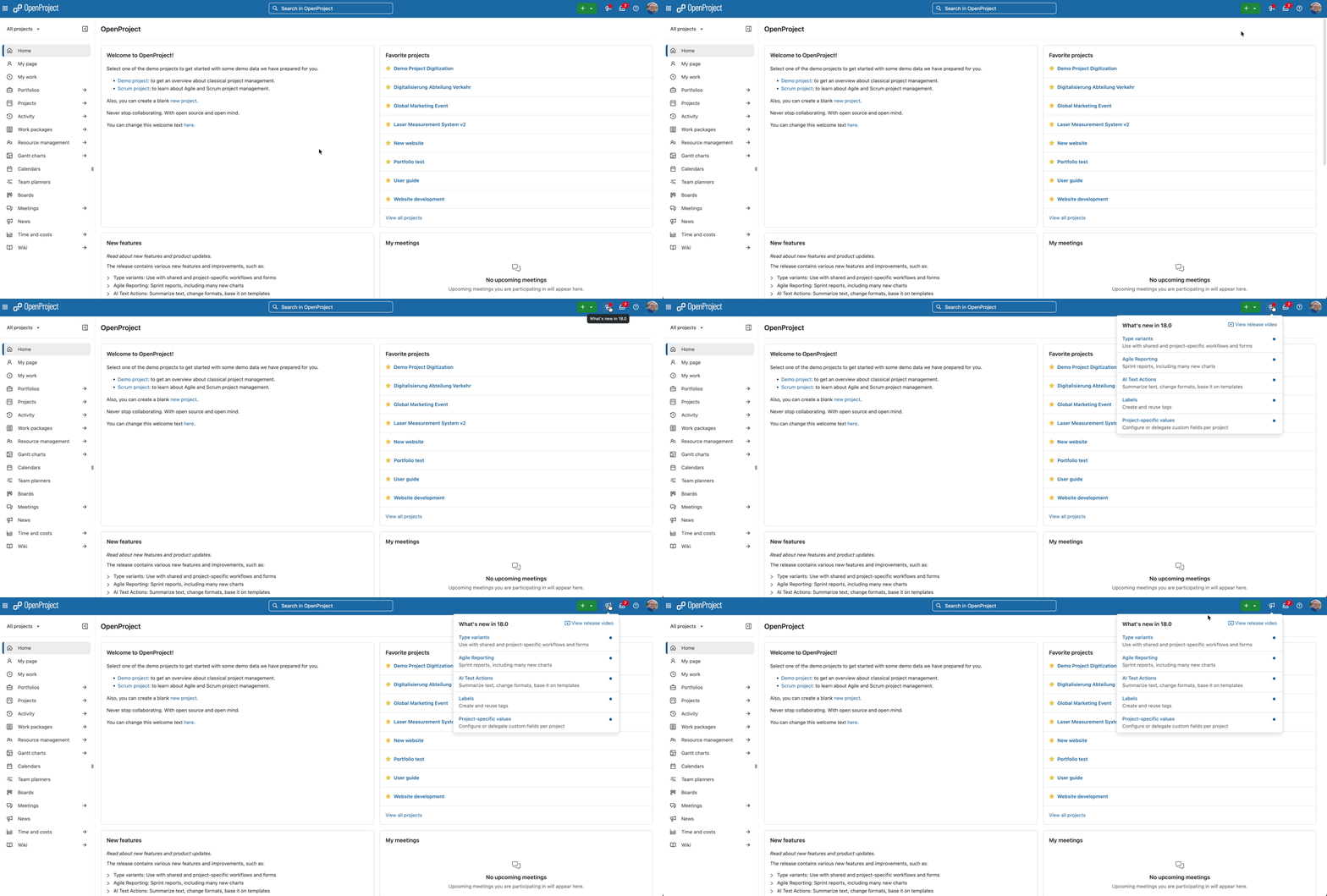
You don’t have to explore everything at once. After you first open the menu, it stays in the navigation bar for a few days, so you can come back to it. Blue dots in the current design preview indicate which feature highlights you haven’t opened yet.
On smaller screens, you’ll find the menu in your user menu instead.
The passion behind the project
“We’ve put a lot of care into every release but a feature is only helpful if our users know it’s there. This is why we added a “What’s new” icon in the navigation bar to highlight key changes in every release. Users can then learn more about any new feature they’re curious about.” – Parimal Satyal and Sonita Soth, Product-Team at OpenProject
For us, Passion Time isn’t only about building entirely new features. Sometimes, it’s about making the features we’ve already developed easier to discover, understand and use. And that’s just as important to us.
We want OpenProject to be powerful and flexible, but we also want people to feel confident using it. After all, developing a useful feature is only part of the job. Helping users discover and understand it matters just as much.
Tipp
Another Passion Project explores how small information icons could help you understand unfamiliar terms and settings directly in OpenProject, with simple explanations and links to our documentation. The idea is still in the specification phase, but the goal is clear: making OpenProject easier to understand and use.
Something to look forward to in December
OpenProject 18.0 is scheduled for December 2, 2026, bringing plenty of new features and improvements to explore. And thanks to this Passion Project, discovering them will be easier than ever.
Once your OpenProject instance has been updated, look for the new ‘What’s new’ entry in the top navigation bar. Give it a click, explore the release highlights, and watch the release video to see what’s new.
We hope you’ll discover a feature or two that makes your daily work a little easier!