News from the product desk: The future of agile work in OpenProject
At OpenProject - the open source project management platform trusted by thousands of teams worldwide - we are making a clear statement: we want to be your sovereign go-to solution for agile teams. We are excited to give you an outlook on what is coming in 2026, in order to further improve agile ways of working within OpenProject.
Co-creation with our Community
We have been exploring, through many interviews with our current and future users - how the backlog refinement and sprint planning experience in OpenProject could evolve to better support agile collaboration. We also analyzed the pain points Jira users experience when working in agile teams. This helped us better understand your needs. We used those insights to provide first prototypes of redesigned backlogs and boards, which were then tested with users. Within an open source project software like OpenProject, you have the possibility to shape the product together with us. This is also why we are releasing our prototypes within this blog post and looking forward to your feedback.
Improved backlog refinement and sprint planning
The goal of the new concept is to make backlog refinement, sprint planning and usage of agile boards more intuitive, structured, and scalable for growing teams and enterprises, especially for teams migrating from Jira to OpenProject, who are working with Scrum, Kanban or SAFe. By improving how backlog items are organized and how teams interact with their sprint planning view, we aim to create a smoother and more flexible agile experience in OpenProject. Let’s take a closer look at how these ideas could support teams during agile ceremonies.
Automated backlog
At the beginning of April 2026, we plan to release the first iteration of our redesigned Backlog module. You will then automatically see all work packages from your project within the backlog without the need of adding them manually to the backlog. In case you don’t want certain work package types to be automatically visible in the backlog you will later on get a possibility to exclude them from the automated backlog.

Structuring large backlogs with backlog buckets
Have you ever struggled with structuring a backlog with hundreds of work packages? We have a solution for you! The updated backlog design will introduce clearer ways to organize backlog items using backlog buckets. You can use buckets to sort your work packages in a way which will help you keep an overview over the backlog and your team’s priorities. You just create buckets which are relevant to you and you easily drag & drop the work packages to newly created buckets. With this improvement, you can easily sort e.g. your “Low hanging fruits”, “Priority bugs” or work packages which are “Ready for development”.

Fast lane for moving work packages
We are also planning to implement improved ordering mechanisms for work packages (move up, move to top, move down, move to bottom, or move to sprint). With one click, you will be able to easily move your to-do’s to a relevant bucket or sprint. Less scrolling back and forth. This makes it faster to manage large backlogs and keep priorities where they belong.

Backlog filters and saved views
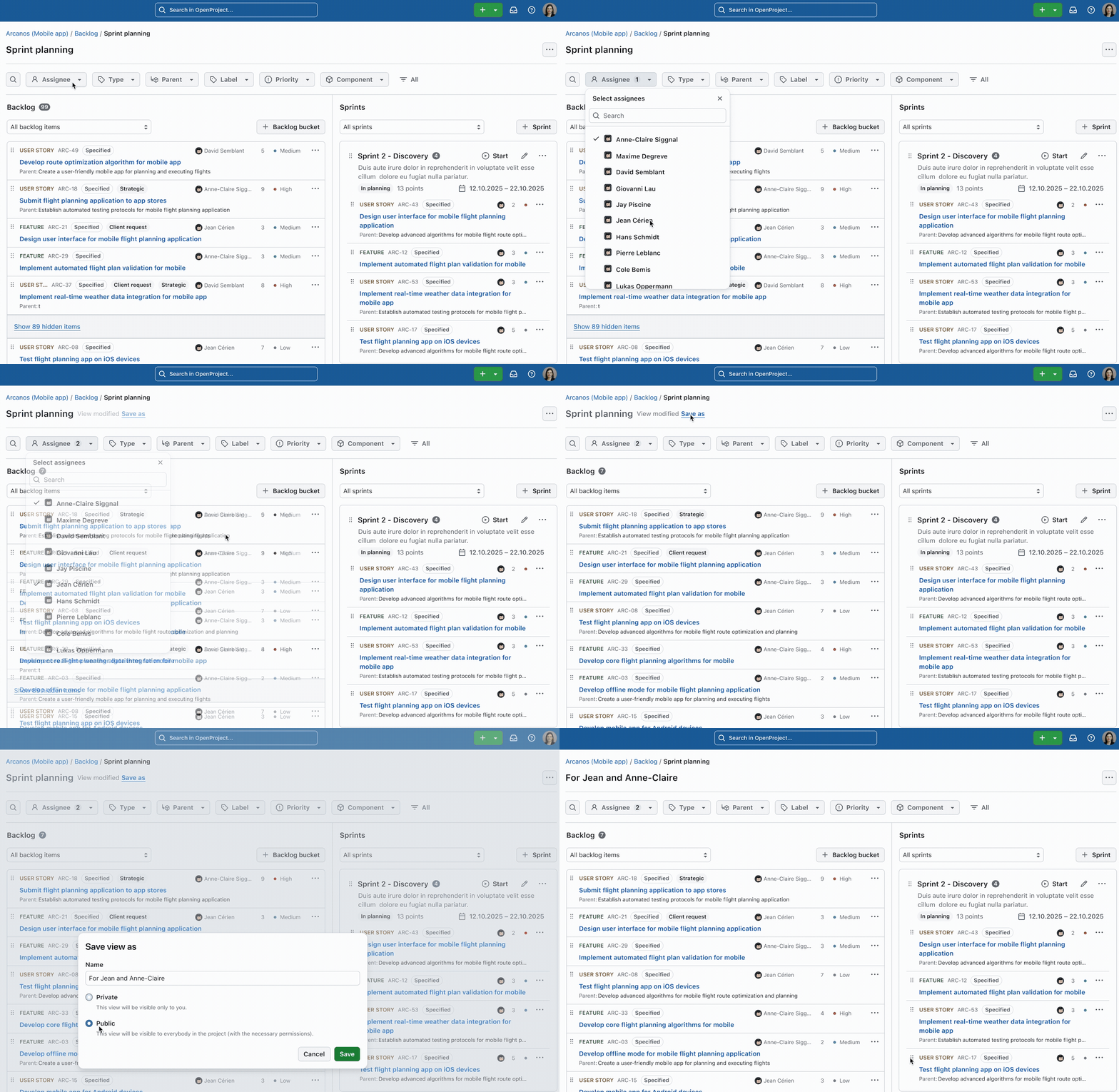
Of course you will also have a possibility to filter your backlog based on all attributes, incl. custom fields. In case you would like to re-use a certain view in future, you will be able to save it as a public or private view. This will allow you to quickly navigate to the set of work packages that is relevant to you and where you would like to zoom in.
Sprint planning
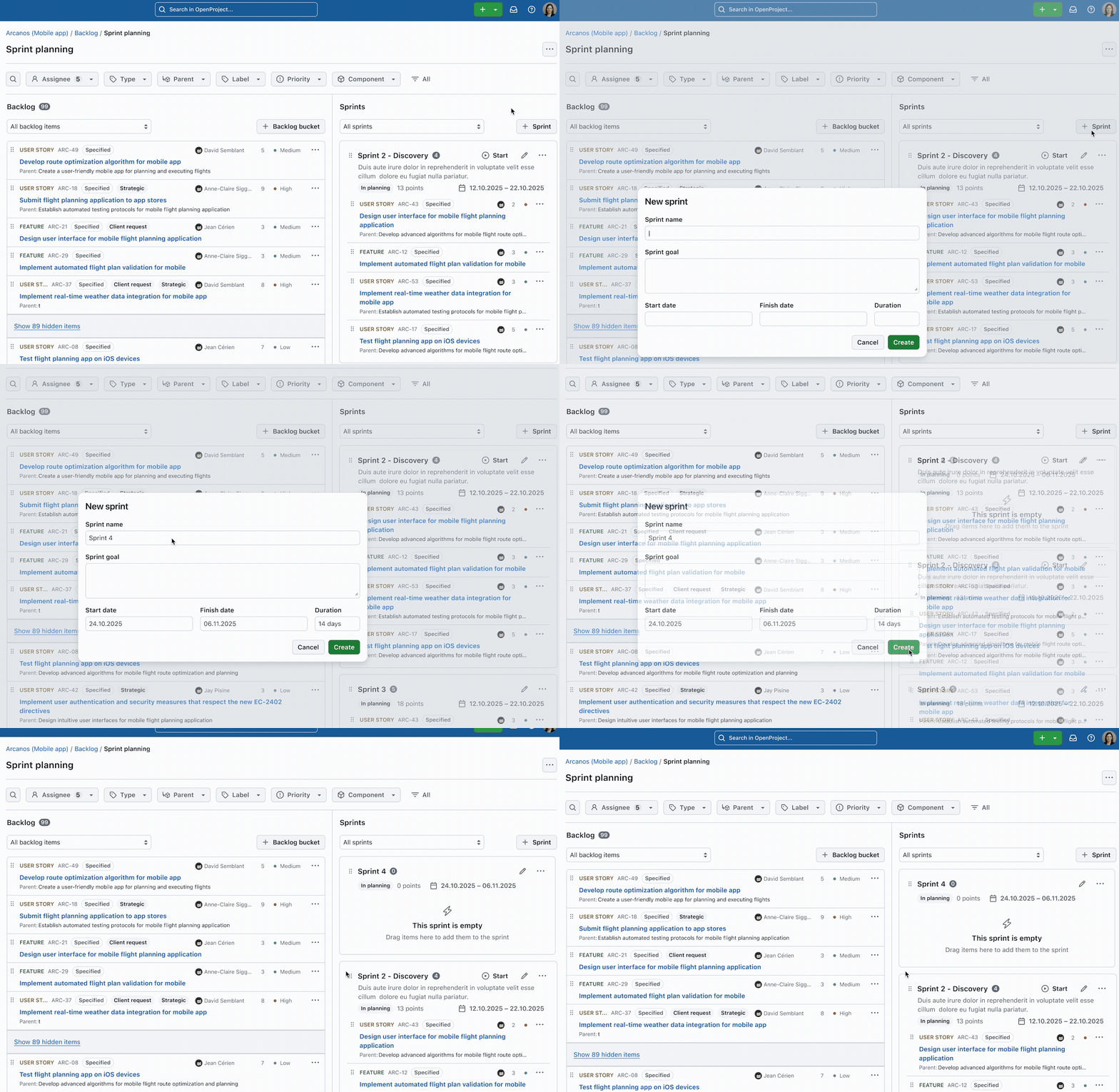
With the backlog view on the left and sprints on the right, you you can see your sprints and backlogs on one screen without scrolling. This view will boost your productivity during sprint planning. The improved layout makes it easier to see what work is ready to be pulled into the next iteration.
At a glance, key information about each backlog work package is visible:
- Name
- ID
- Type
- Status
- Assignee
- Number of story points
- Priority
You will have the possibility to not only define the sprint scope but to also highlight the sprint goal in order to align your team, as well as to set sprint dates.
Active sprints and sprint boards
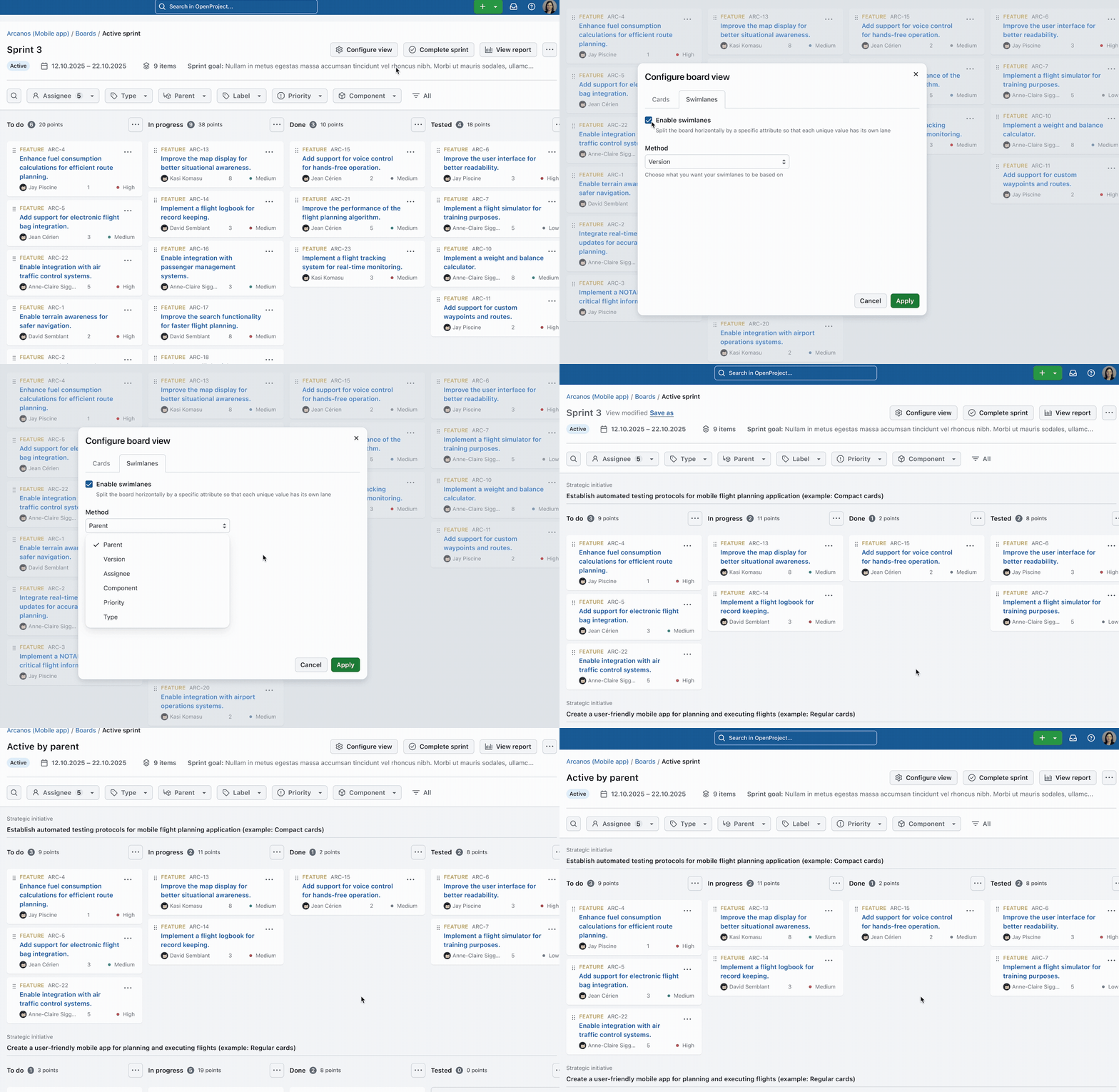
Once you’ve started your sprint, you will automatically get a sprint board, showing you the planned sprint scope. This is your team’s go-to place during the sprint. With this overview, you will always see who is working on which topic and how the team is making progress.

Multiple active sprints within one project
Do you have various teams working within one project? Do they want to start separate sprints in parallel? No problem! OpenProject will allow admins to define if a project should be a single-sprint or multi-sprint project. This brings more clarity to your teams and their sprints, at the same time allowing them to work within the same backlog.
Board filters and saved views
Once the sprint begins, teams rely on boards to manage their day-to-day work. The new concepts explores how sprint boards could provide a clearer way to track progress. With introduced filters, you will be able to adjust the board view to your needs. You can filter for any kind of attributes, incl. custom fields. In case you would like to re-use some of the filter sets, you can always save the view as a private or public view.
Configurable work package cards
The redesigned board behavior is intended to make daily work management more intuitive. Clearly structured work items and the board layout help teams stay focused on progress and flow while reducing visual clutter. With the configure board view, teams could adjust the card size and choose which information should be displayed on each card. The design illustrates three levels of card configuration: compact, regular, and full; giving users flexibility in how much information is displayed.


Status mapping for complex workflows
The concept will also introduce the ability to map multiple workflow statuses to a single column, giving teams more flexibility in how they visualize their workflow. This will be a booster for teams working with complex workflows.

Work in progress limits
Would you like your team to deliver faster? Focusing on the most important topics and reducing work in progress is an essential productivity booster for agile teams. OpenProject will support you on this path through work-in-progress limits which can be set for each column individually.

Swimlanes
Users will get a possibility to enable swimlanes and configure them based on attributes such as parent work item (e.g. epic), assignee, version, component, priority, or type, allowing teams to organize work in a way that best supports their workflow. Swimlanes will provide your team with a very structured board view.

Agile reports
To support monitoring and improvement, teams can also access reports designed to help track, analyze, and optimize performance during and after a sprint. These will be very helpful during retrospectives. We are planning multiple reports and graphs:
- sprint reports
- burndown charts
- burnup charts
- velocity charts
- created vs. resolved chart
- cumulative flow diagram
Sharing
Especially within enterprises, when working based on SAFe principles, most teams should be aligned on sprint start and end dates. Already within our first agile release (currently planned for April 2026), we will allow users to share sprints through the whole instance or within a certain portfolio or program. This means that teams working with shared sprints will share the sprint dates and goal, but still can define their own sprint scope relevant for the team. Under the administration settings, sharing sprints across projects can be enabled or disabled. Projects can also be configured to only receive shared sprints.
Versions and sprints
Soon, you will be able to associate work packages with versions and sprints at the same time. An epic then can be planned for a release using the version field and can be planned for a certain sprint at the same time. In Q2 2026, we are also going to introduce an additional version field, “Observed in versions”, which — in addition to the version that defines the release version — allows you to track the versions in which a bug occurred.
Kanban boards
In case you prefer to work using Kanban methodology, you will of course have a possibility to create Kanban boards, also multi-project Kanban boards, including all the new functionalities described in the article, like swimlanes, work-in-progress limits, filters, saved views. etc.
Global Backlog module for SAFe organizations
The planned global Backlog module will help enterprises to manage big agile portfolios. Especially for SAFe organizations, this might be the go-to place for navigation between sprints and board. Among others, you will also have a possibility to filter for the PI (Product Increment) scope or for all dependencies across the whole portfolio.
And all that is coming to OpenProject in 2026!
These concepts are all part of our ongoing design exploration to improve agile workflows in OpenProject. While not all elements are part of the product yet, they represent the direction we are exploring to better support teams working with Scrum, Kanban or SAFe.
We’re continuing to refine these ideas and look forward to sharing future updates as the designs evolve. In case you would like to provide your feedback on those prototypes, please feel free to comment on the work packages within our roadmap. We would love to hear from you!
Stay tuned for our future agile releases!