Actualités du bureau des produits : collaboration en temps réel dans les documents
À partir de la version 17.0, actuellement prévue pour janvier 2026, OpenProject introduit un module Documents entièrement remanié avec des capacités de collaboration en temps réel. Il s’agit d’une avancée significative dans la manière dont les équipes peuvent travailler ensemble au sein d’OpenProject, permettant à plusieurs utilisateurs d’éditer des documents simultanément tout en voyant les modifications des autres au fur et à mesure.
Pourquoi ce changement est-il nécessaire ?
Les équipes de projet travaillent de manière de plus en plus distribuée et asynchrone. Qu’il s’agisse de lancer des idées, de rédiger les exigences d’un projet, de rédiger des rapports d’étape ou de planifier la phase suivante du travail, la collaboration est au cœur de la réussite des projets. Cependant, les flux de travail traditionnels d’édition de documents créent souvent des frictions : les fichiers sont dupliqués, les versions ne sont plus synchronisées et les membres de l’équipe ont du mal à savoir quelle est la version la plus récente. L’édition parallèle entraîne des conflits, des pertes de données et des frustrations.
Chez OpenProject, nous essayons toujours de trouver des moyens d’aider nos utilisateurs à mieux communiquer et collaborer. Nous pensons que les équipes veulent travailler ensemble en temps réel, voir qui d’autre contribue et avoir la certitude que leurs modifications ne seront pas perdues ou écrasées. C’est précisément la raison pour laquelle nous avons travaillé sur les mises à jour du module Documents.
Important
Veuillez noter que les changements décrits dans cet article sont prévus pour la version 17.0, qui est actuellement programmée pour le 14 janvier 2026.
Collaboration en temps réel dans OpenProject
Le module Documents remanié apporte à OpenProject une véritable collaboration en temps réel. Lorsque vous ouvrez un document, vous pouvez voir qui d’autre est en train de le modifier. Leurs curseurs apparaissent sur la page, montrant exactement où ils se trouvent et quels changements ils effectuent au fur et à mesure qu’ils saisissent leurs contributions.
La collaboration en temps réel ne se limite pas à la possibilité de voir les modifications apportées par les autres utilisateurs. Il s’agit également de supprimer les obstacles qui ralentissent les équipes : plus besoin d’attendre que quelqu’un ait fini de modifier un document avant de pouvoir y apporter sa contribution, plus besoin de fusionner des versions contradictoires, plus besoin de parcourir les pièces jointes des e-mails ou les disques partagés pour trouver la dernière version d’un document. Le document le plus récent se trouve toujours au même endroit et tout le monde travaille à partir de la même source de vérité.
Nouveautés dans le module Documents
Le nouveau module Documents représente à la fois une amélioration significative de l’expérience utilisateur et un changement technologique fondamental :
Édition collaborative en temps réel : plusieurs utilisateurs peuvent modifier le même document simultanément. Vous voyez les utilisateurs en ligne, où se trouvent leurs curseurs et ce qu’ils modifient en temps réel. La gestion complexe des conflits a lieu automatiquement en arrière-plan, ce qui garantit que personne ne perd ses modifications.
Éditeur moderne de texte enrichi : les documents utilisent désormais BlockNote, un éditeur de texte enrichi moderne et open source qui rend l’écriture et la mise en forme simples et intuitives. L’ajout de contenu enrichi comme des images, des vidéos, des fichiers audio ou des blocs de code est très simple.
Références dynamiques aux lots de travaux : vous pouvez désormais inclure des références à des lots de travaux directement dans les documents en utilisant les commandes /op ou /workpackage. Ces références sont mises à jour de manière dynamique, de sorte que si le nom, le statut ou le type d’un lot de travaux change, ces changements sont automatiquement répercutés dans le document. Cela permet également de créer facilement des liens vers des fonctionnalités ou de référencer des bugs sans avoir à copier et coller manuellement des informations qui pourraient devenir obsolètes.
Pièces jointes : joignez des fichiers à n’importe quel document pour fournir un contexte supplémentaire, des documents d’appui ou des ressources connexes. Tout reste organisé au même endroit.
Amélioration de la conception et de la convivialité : l’ensemble de l’interface a été repensé dans un souci de clarté et de facilité d’utilisation, avec un accent particulier sur une expérience d’édition sans distraction.
Jetez un coup d’œil à ce court aperçu Gif qui montre les fonctionnalités listées ci-dessus :
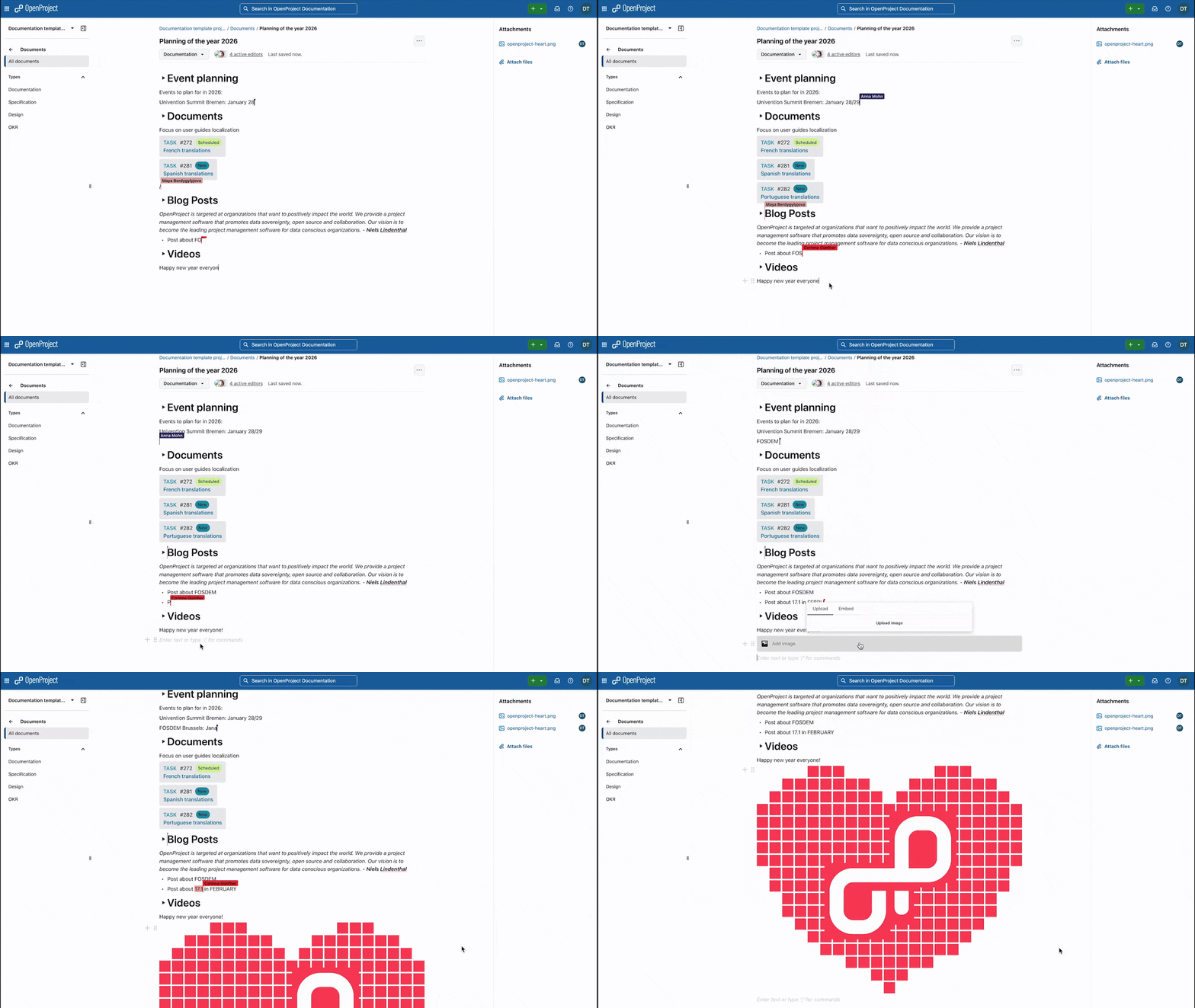
Aperçu d’OpenProject 17.0 : quatre éditeurs actifs dans le module Documents, ajout d’une image de cœur au document, liaison de lots de travaux, et rédaction et édition de texte de façon collaborative.
Fondements techniques
Rendre possible la collaboration en temps réel a nécessité un travail substantiel sur la base technique du module Documents. Nous avons adopté deux puissantes technologies open source : BlockNote comme éditeur de texte enrichi et Hocuspocus comme outil de collaboration en temps réel.
BlockNote fournit l’expérience d’édition avec laquelle les utilisateurs interagissent directement. Il est extensible, moderne et conçu dans un esprit de collaboration. Un aspect particulièrement intéressant de l’utilisation de BlockNote est que nos nouveaux composants de référence pour les lots de travaux sont conçus pour être génériques et réutilisables, de sorte que d’autres outils utilisant BlockNote peuvent également bénéficier de ces mêmes composants. Par exemple, Docs, qui fait partie de LaSuite en France et d’openDesk en Allemagne, est basé sur BlockNote. XWiki teste également une intégration avec BlockNote, qui permettra aux utilisateurs de ces outils d’appeler notre extension BlockNote et d’ajouter des liens dynamiques vers les lots de travaux d’OpenProject dans leurs textes. La combinaison de la plateforme de gestion des connaissances de XWiki et des capacités de gestion du travail d’OpenProject est particulièrement efficace pour remplacer le paquet Jira-Confluence d’Atlassian. Ces intégrations offrent une expérience plus cohérente aux utilisateurs qui travaillent avec différents outils dans leur espace de travail numérique.
Hocuspocus gère la synchronisation complexe en temps réel et la résolution des conflits qui se produisent dans les coulisses. Lorsque plusieurs utilisateurs éditent simultanément, Hocuspocus veille à ce que les modifications soient correctement fusionnées, qu’aucune édition ne soit perdue et que l’expérience d’édition reste fluide.
These technologies form a solid foundation for collaborative editing in the Documents module today, and potentially across other areas of OpenProject in the future.
Perspectives d’avenir
Le nouveau module Documents est la première étape d’une vision plus large de la collaboration en temps réel dans OpenProject. Toutefois, il s’agit également d’un banc d’essai. Nous utilisons Documents pour affiner notre technologie, tester notre infrastructure et apprendre comment nos utilisateurs collaborent dans la pratique.
Une fois que la technologie sera stable et que nous aurons acquis une expérience concrète, nous prévoyons d’introduire la collaboration en temps réel dans d’autres domaines d’OpenProject où elle pourra apporter une valeur ajoutée. Les lots de travaux sont un candidat évident. Notre objectif est de vous permettre de voir vos collègues modifier les descriptions des lots de travaux ou de mettre à jour les champs personnalisés en temps réel, avec la même expérience que celle dont vous bénéficiez dans Documents.
Comment accéder au nouveau module Documents
Pour les utilisateurs de la version Cloud : si vous avez un abonnement OpenProject Cloud, le nouveau module Documents est disponible à partir de la version 17.0. Vous n’avez rien à faire. Hocuspocus et toutes les autres dépendances sont déjà installées et configurées. Assurez-vous simplement que le module Documents est activé pour chaque projet où vous souhaitez l’utiliser, et vous pourrez commencer à collaborer immédiatement.
Pour les utilisateurs sur site : la façon dont vous accédez aux nouveaux documents dépend de votre type d’installation :
-
Installations conteneurisées (Kubernetes, Docker, ou Helm charts) : tout fonctionne directement. Hocuspocus est automatiquement installé et configuré pour vous et la collaboration en temps réel est activée par défaut.
-
Installations basées sur des paquets (paquets DEB/RPM) : vous devrez installer manuellement les dépendances telles que Hocuspocus et les configurer pour permettre la collaboration en temps réel.
Remarque
Qu’advient-il des documents existants ?
Tous les documents créés avant la version 17.0 restent accessibles exactement comme avant, en utilisant l’éditeur de texte basé sur CKEditor. Ces documents ne permettent pas une collaboration en temps réel, mais ils sont entièrement fonctionnels et inchangés. Vous pouvez continuer à les utiliser comme vous l’avez toujours fait.
À partir de la version 17.0, tous les nouveaux documents créés utilisent BlockNote et prennent en charge la collaboration en temps réel (si la collaboration en temps réel est correctement configurée et activée). Cela signifie que des documents de l’ancien style et du nouveau style coexisteront dans votre instance OpenProject. Les documents plus anciens porteront une étiquette « Legacy » pour faciliter leur identification.
Important
Si la collaboration en temps réel est activée et que les utilisateurs créent de nouveaux documents, mais que la collaboration en temps réel est ensuite désactivée (soit manuellement, soit en raison de problèmes survenant sur le serveur Hocuspocus), ces documents ne seront plus accessibles. Nous sommes conscients que cela peut entraîner une perte d’accès aux données, c’est pourquoi nous vous recommandons vivement de ne pas désactiver la collaboration en temps réel une fois qu’elle a été activée.
Si la collaboration en temps réel n’est pas activée (par exemple, si Hocuspocus n’est pas disponible), les nouveaux documents continueront d’utiliser l’ancien style avec CKEditor, sans les fonctions de collaboration en temps réel.
Vos commentaires
Bien entendu, il reste encore beaucoup de travail à faire avant de bénéficier d’une collaboration en temps réel dans l’ensemble d’OpenProject. Nous aimerions beaucoup que vous nous aidiez à atteindre cet objectif.
Vos commentaires nous aideront à comprendre ce que nous faisons bien, ce que nous pouvons améliorer et ce sur quoi nous devrions nous concentrer. L’édition en temps réel dans OpenProject change-t-elle votre façon de travailler ? L’utiliserez-vous dans vos propres projets ? Comment pouvons-nous l’améliorer ?
En tant qu’entreprise open source, nous développons de manière ouverte et apprécions les contributions de notre communauté d’utilisateurs. Si vous avez des commentaires sur le nouveau module Documents, des questions sur son fonctionnement ou des idées pour l’améliorer encore, n’hésitez pas à nous en faire part. Rejoignez notre instance Community et faites-nous part de vos commentaires.
Crédits
Nous tenons à remercier l’équipe à l’origine de BlockNote (Yousef El-Dardiry, Nick Perez et Matthew Lipski) pour avoir créé un excellent éditeur de texte enrichi open source. Merci également à l’équipe d’Hocuspocus pour avoir fourni l’infrastructure robuste de collaboration en temps réel qui rend tout cela possible.
Nous tenons également à remercier les équipes de conception, de développement et d’assurance qualité d’OpenProject pour leur travail acharné qui a rendu tout cela possible.