When migrating from Jira to OpenProject, can our teams still do what they need to do? This is one of the most important questions we need and want to answer. While the best way to evaluate this is to look at your organization’s specific use cases together, we also want to provide a detailed comparison you can use as a starting point.
Jira Data Center is a powerful and highly configurable platform. Organizations may have spent years adapting it to their processes, adding apps and building workflows around it. If you are considering a move to OpenProject, you therefore don’t just want to know which features OpenProject has. You want to know what happens to the ways of working your teams depend on today.
That’s what this article is about. We’ll look at the jobs your teams need to accomplish, how OpenProject supports them, and how that compares with Jira Data Center and also Jira Cloud.
Consejo
This is a detailed comparison, and intentionally so. We could have covered these twelve capabilities in separate articles, but decided to give you one resource to share with colleagues and decision-makers. Use the navigation below to jump directly to the capabilities that matter most to you.
Quick article navigation:
- Comparison table
- Feature deep dives
- Adapt workflows to different teams, roles and types of work
- Structure work and manage dependencies
- Plan and prioritize work with agile boards and backlogs
- Plan work and dependencies on a timeline
- See what has changed since an earlier project plan
- Track time and understand where effort goes
- Plan and control project costs and budgets
- Plan capacity and find the right people for the work
- Run meetings and turn decisions into action
- Create and collaborate on documentation
- Organize and oversee work across projects, programs and portfolios
- Represent complex classification data across multiple hierarchy levels
- User feedback
- Conclusion
Before we compare features: What does everyday work look like?
Not every capability that matters in a migration belongs in a comparison table. Before we look at the larger project management capabilities in detail, let’s start with a few of the everyday things teams need to do.
Imagine Anna, a project manager starting her workday at 8:00 a.m. She checks her email and sees that she has five new OpenProject notifications. So she follows the link to her OpenProject notification center to see what needs her attention.
Samuel, a freelancer working with her team, has assigned her a work package for review. The latest document is attached from Nextcloud. Anna reviews it, leaves a comment on the work package and assigns it to her colleague Francesca for the next step.
It’s now 8:08. Anna goes to get her first coffee, knowing what has changed, what she has taken care of and who is responsible for what happens next.
Later that morning, she opens her project dashboard to prepare for a team check-in. She can see the current project status, upcoming milestones and the work packages that matter to her team. When she needs more detail, she opens a saved work package view to filter, group and analyze the underlying work.
These are all fairly ordinary parts of a project manager’s day. Notifications, work packages, files, comments, assignments, dashboards and reports help Anna understand what needs her attention, move work forward and keep an eye on the bigger picture.
But that’s only part of what organizations expect from a project management platform. Let’s look at the capabilities that become particularly important when evaluating a move from Jira.
Comparison table: OpenProject vs. Jira capabilities
Nota
Last reviewed: October 2026. This comparison reflects the product capabilities and documentation available at the time of review. Features and availability may vary by edition, deployment model and licensing plan.
Mapping out “Jira” features is easier said than done because Jira Cloud and Jira Data Center differ in important ways. In addition, many capabilities are provided through additional Atlassian products or Marketplace apps.
That’s why we distinguish between Jira Data Center and Jira Cloud in the table below. Where an additional product or app is required, we’ll make that visible directly in the respective cell.
Nota
Don’t just take our word for it. We link each assessment directly to the relevant OpenProject, Atlassian or Marketplace documentation so you can verify our conclusions.
Consejo
Looking for something that’s not in the table? This comparison focuses on project and work management capabilities that are particularly relevant when evaluating a move from Jira. For a complete overview of OpenProject’s features, explore the OpenProject documentation. Or get in touch with us to discuss your specific use case.
Feature deep dives: 12 capabilities in detail
Even though we could end this article at this point, we want to take a closer look at each capability listed in the table above.
As mentioned before, comparing OpenProject with just “Jira” would not be accurate. So we’ll indicate whether a Jira capability is, at the time of writing, available in Data Center (DC), Cloud or both, and when it requires an additional Atlassian product or Marketplace app.
1. Adapt workflows to different teams, roles and types of work
Teams often need different workflows depending on the type of work and the people involved. You may want to define who can move which type of work to which status, without forcing every team through the same workflow.
Jira DC + Cloud: Workflow configuration with conditions and validators
Jira Data Center provides extensive workflow configuration, including conditions and validators that control when transitions can be performed. Jira Cloud also supports configurable workflows and transition rules, including restrictions based on roles, groups, permissions or specific users.
OpenProject: Workflow configuration by type and role
OpenProject configures workflows around the combination of work package type and role. Admins can select a type and a role, then define the allowed status transitions in a matrix.
This is not a capability Jira lacks. The difference is in how it is exposed: OpenProject puts type, role and allowed transitions into one explicit configuration model.

Image: OpenProject workflow configuration. Configure allowed status transitions based on work package type and role.
2. Structure work and manage dependencies
Larger pieces of work need to be broken down and connected. Teams need to make dependencies visible and, where one task genuinely blocks another, prevent work from being completed in the wrong order.
Jira DC + Cloud: Hierarchies and linked dependencies
Jira Data Center lets you structure work hierarchically and link related work items. Jira Cloud also supports configurable work-item hierarchies, with additional hierarchy levels available on Premium and Enterprise. Jira’s native issue links can represent dependencies, but enforcing the status of an arbitrarily linked blocker requires additional workflow functionality.
OpenProject: Hierarchies and enforced dependencies
OpenProject combines parent-child hierarchies with different types of work package relations. These include Predecessor / Successor and Blocks / Blocked by relations. A blocking relation also affects the workflow: the blocked work package cannot be closed or resolved until the blocking work package is closed.

Image: OpenProject work package relations. Connect related work and use blocking relations to prevent work packages from being closed in the wrong order.
3. Plan and prioritize work with agile boards and backlogs
Agile teams need a way to organize upcoming work and decide what should be worked on next. This can mean assigning prioritized work to Sprints or managing it as a continuous flow, while keeping track of items that are not ready to be scheduled yet.
Jira DC + Cloud: Scrum and Kanban backlogs
Jira Data Center provides Scrum and Kanban backlogs for planning and prioritizing work. Jira Cloud’s Scrum backlog lets teams rank work and organize it into Sprints, Epics and Versions.
Based on our review of Jira Data Center and Jira Cloud, we did not identify a built-in feature that directly corresponds to OpenProject’s freely named Backlog buckets. Jira offers other ways to organize and prioritize backlog items, and Marketplace apps can provide additional grouping options.
OpenProject: Boards, backlogs and Sprints
OpenProject supports agile planning with boards, backlogs and Sprints. Before work is assigned to a Sprint, Backlog buckets provide lightweight, freely named groups for organizing and prioritizing backlog items without turning those groups into Epics, Versions or Sprints.

Image: OpenProject Backlog buckets. Organize upcoming work in freely named buckets before assigning it to a Sprint.
4. Plan work and dependencies on a timeline
Project plans become easier to understand when teams can see how work fits together over time. They need to understand dependencies and adjust the plan when dates or priorities change.
Jira DC: Advanced Roadmaps, Jira Cloud: Plans
Jira Data Center includes Advanced Roadmaps for cross-project planning on a timeline, including dependencies, warnings, releases and capacity. Jira Cloud Plans can also visualize dependencies and scheduling conflicts, with advanced planning available on Premium and Enterprise.
OpenProject: Timeline planning with integrated Gantt charts
OpenProject’s Gantt charts let you plan and update work directly on a timeline, including start and finish dates, hierarchies and dependencies. Predecessor and successor relationships can also affect scheduling, for example by automatically pushing dependent work into the future when dates conflict. Gantt charts are included in the free, self-hosted Community edition.
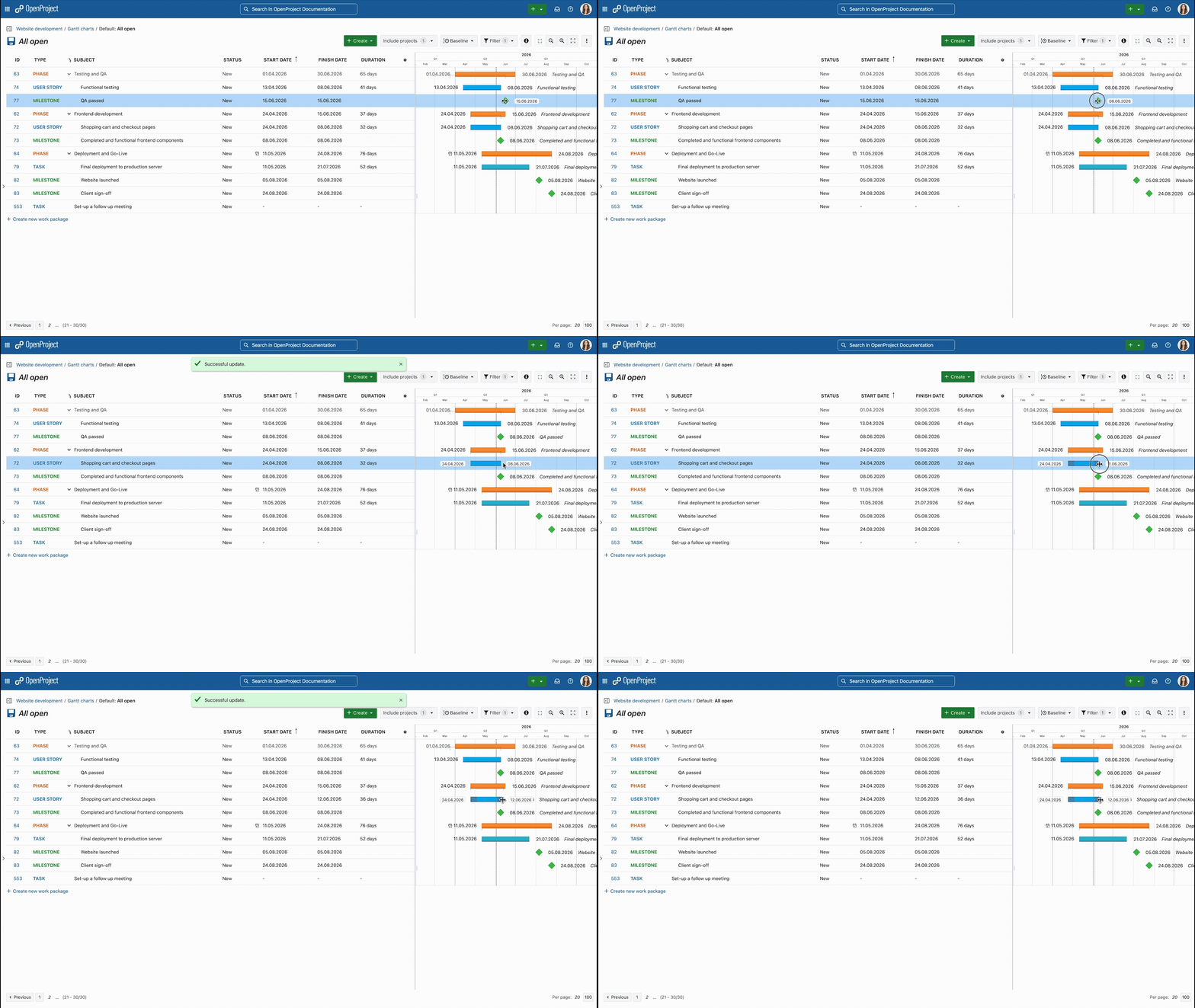
Gif: OpenProject Gantt chart. Plan work, dates and dependencies directly on the timeline.
5. See what has changed since an earlier project plan
As a project progresses, it can be important to understand how the plan has changed. Teams need to compare the current plan with an earlier point in time without manually reconstructing changes across individual work items.
Jira DC + Cloud: Issue history, Jira DC: Planning scenarios
Jira provides issue history and ways to query changes, but our research found no comparable native multi-item baseline comparison in either Jira Data Center or Jira Cloud. Advanced Roadmaps Scenarios in Data Center are designed for experimenting with different versions of a future plan, rather than comparing the current plan with its historical state. Marketplace apps can provide additional historical comparison capabilities.
OpenProject: Historical plan comparison with Baseline
OpenProject’s Baseline comparison shows how a filtered set of work packages has changed over time, including changed values and work packages that were added or removed from the view. Comparing changes since yesterday is included in the Community edition, while additional comparison periods and custom date ranges are available as an Enterprise add-on.

Image: OpenProject Baseline comparison. Compare the current project plan with an earlier point in time and see what has changed.
6. Track time and understand where effort goes
Tracking time is not only about recording hours. Teams also need a clear overview of where their effort is being spent across tasks and projects.
Jira DC + Cloud: Time estimates and work logs
Jira Cloud lets users estimate work, log time and compare original estimates with actual time spent. Jira Data Center provides native time tracking as well. Organizations that need more extensive timesheet functionality and time reporting can extend Jira through Marketplace apps such as Tempo Timesheets.
OpenProject: Time tracking, personal time overview and reports
OpenProject combines time tracking with a personal My time tracking page and configurable time and cost reports. Users can log time directly, switch between calendar and list views, review daily, weekly or monthly totals, and edit or move entries in the calendar. Time can also be tracked directly on work packages or with a start/stop timer. Time and cost reports can be filtered and exported, including timesheets as PDF.

Image: OpenProject My time tracking. Review and manage personal time entries across days, weeks or months in one place.
7. Plan and control project costs and budgets
Managing a project budget requires more than tracking time. Teams need to know what a project is expected to cost, what has actually been spent and how much of the budget remains, including both labor and other project costs.
Jira DC + Cloud: Project costs and budgets via Marketplace apps
Based on our review, we did not identify a native Jira Data Center or Jira Cloud module that combines project budgets with planned and actual labor and unit costs in the same way as OpenProject. Additional cost and budget management capabilities are available through Marketplace apps, with different products for Data Center and Cloud.
OpenProject: Integrated project budgets and costs
OpenProject lets you create project budgets and compare planned, spent and remaining costs. Budgets can include planned labor and unit costs, while time and costs logged against associated work packages contribute to actual costs.

Image: OpenProject project budget. Compare planned, spent and available budget, including labor and unit costs.
8. Plan capacity and find the right people for the work
Planning upcoming work also means knowing who can take it on. Teams need to understand available capacity and find people with the right skills, even when they don’t yet know who should take on a specific task.
Jira DC: Team capacity, Jira Cloud: Individual capacity
Jira Data Center’s Advanced Roadmaps supports capacity planning for teams and iterations. Jira Cloud Premium and Enterprise additionally provide individual capacity planning. Skills-based matching and open resource requests may require additional tooling.
OpenProject: Capacity, skills and resource requests
OpenProject Resource management combines working schedules, availability, skills and capacity with project planning. If you don’t yet know who should do the work, you can create an open resource request based on required skills, attributes, capacity and time period. OpenProject then matches the request with suitable people and shows their availability before you staff it.

Image: OpenProject Resource Management. Plan capacity over time, allocate work to team members and keep open resource requirements visible alongside planned work.
9. Run meetings and turn decisions into action
Meetings often result in decisions and follow-up work that need to stay connected to the rest of the work. Teams need to prepare meetings, capture decisions and make sure resulting actions don’t disappear into meeting notes.
Jira DC + Cloud + Confluence: Meeting documentation
For Jira teams, Atlassian provides meeting management through Confluence. Confluence Data Center includes a Meeting Notes blueprint for planning meetings and sharing notes and actions, while its Jira integration lets users create Jira issues from Confluence content. Jira Cloud and Confluence Cloud similarly work together to connect collaborative content with Jira work items.
OpenProject: Meetings, decisions and follow-up work
OpenProject includes meeting management for preparing, running and documenting meetings. Meetings can be recurring, exported as PDF or downloaded as iCalendar events. Teams can structure agendas, document outcomes and decisions, and link agenda items and outcomes to existing work packages or turn them directly into new ones.

Image: OpenProject Meetings. Connect agenda items, decisions and follow-up work directly with work packages.
10. Create and collaborate on documentation
Project or Product work usually comes with documentation that needs to stay accessible and up to date. Teams need to create shared documentation together and keep it connected to the work it describes.
Jira DC + Cloud + Confluence: Collaborative documentation
Atlassian provides collaborative documentation through Confluence rather than Jira itself. Confluence Cloud supports pages and Live Docs for structured documentation and real-time collaborative work, including embedded Jira work items. Confluence Data Center provides the corresponding documentation platform for self-managed Jira environments.
OpenProject: Integrated Documents and project wiki, with optional XWiki integration
OpenProject provides two built-in ways to keep documentation close to work. OpenProject Documents let teams create and collaboratively edit documents, including real-time collaboration and links to work packages.
For structured knowledge, OpenProject also includes a built-in wiki per project. Teams can organize documentation, specifications and guidelines in hierarchical wiki pages and link them to OpenProject resources. Wiki pages can also include dynamic work package tables and Gantt chart views. From a work package, users can link an existing wiki page or create a new one, keeping knowledge connected to the work it describes.
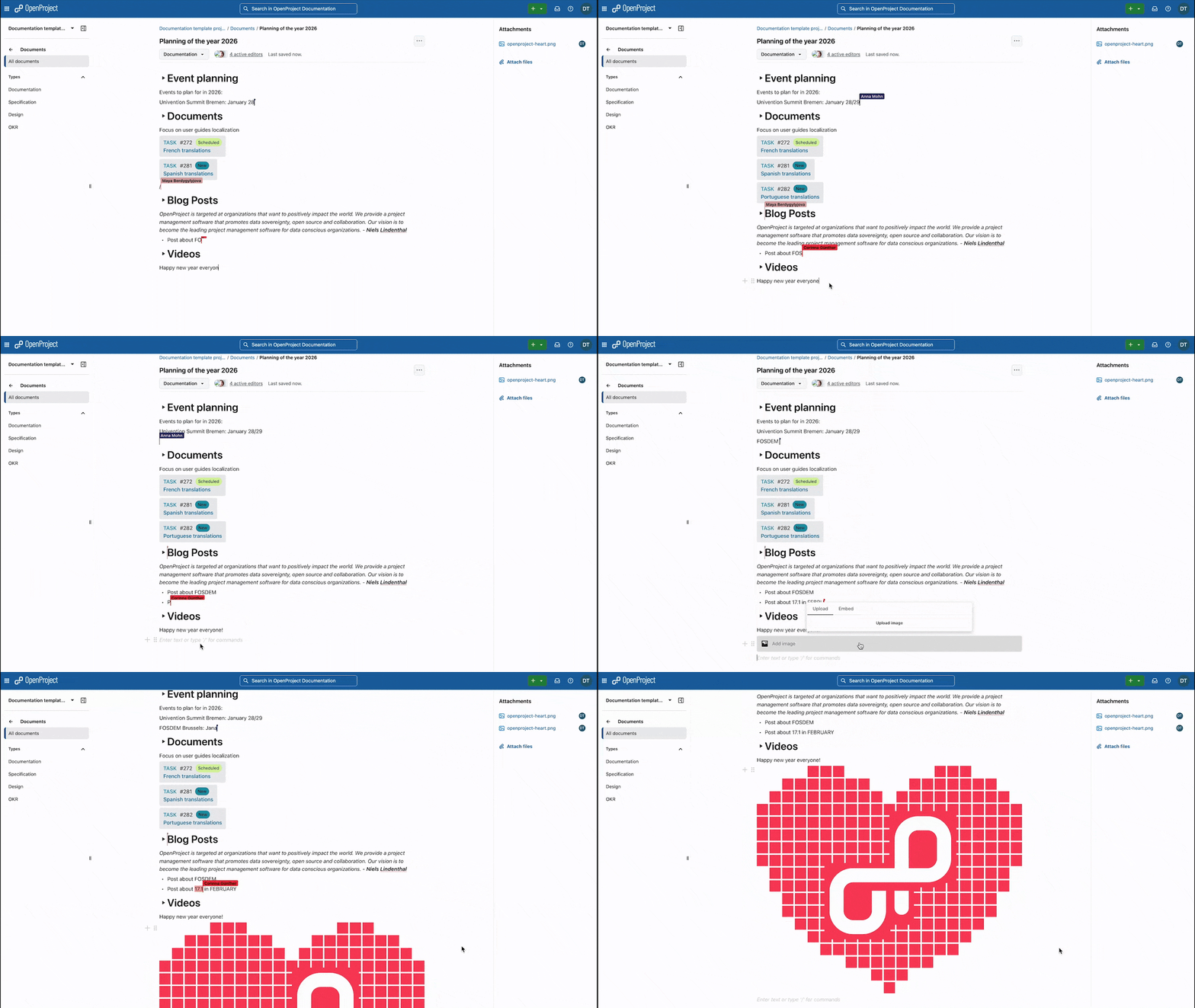
Gif: OpenProject Documents. Collaborate on documents in real time and keep them connected to work.
Organizations that need a dedicated knowledge management platform can additionally integrate OpenProject with XWiki (Enterprise add-on). XWiki pages can be created or linked from OpenProject, including as relations to work packages, while the XWiki integration can link and create OpenProject work packages from XWiki content. The XWiki integration is an Enterprise add-on available with the Corporate plan.
This gives organizations a choice: keep project or product documentation within OpenProject using Documents and the built-in wiki, or connect XWiki when they need a dedicated knowledge management platform.
11. Organize and oversee work across projects, programs and portfolios
As the number of projects grows, teams and management need different levels of overview. They need to navigate from individual projects to programs and strategic portfolios while keeping track of status and progress.
Jira DC: Advanced Roadmaps, Jira Cloud: Plans
Jira Data Center includes Advanced Roadmaps for planning work across multiple projects. Jira projects themselves remain separate containers rather than forming a nested project hierarchy. Jira Cloud Plans similarly provide cross-project planning, including a Program board for viewing work, priorities and dependencies across multiple teams. For broader strategic portfolio management, Atlassian also offers its Strategy Collection, including Focus and Align, as additional Cloud products. Marketplace apps can add additional portfolio structures.
OpenProject: Hierarchical portfolios, programs and projects
OpenProject structures portfolios, programs and projects as workspaces in a hierarchy. A portfolio can group programs and projects, programs can group related projects, and projects can contain subprojects. Portfolio views aggregate status across the underlying initiatives, giving management a strategic overview while teams continue working in their individual projects.

Image: OpenProject Portfolio overview. Bring portfolio status, timelines and underlying programs and projects together in one workspace.
12. Represent complex classification data across multiple hierarchy levels
Some organizational data does not fit into a simple list of values. Teams may need to represent structures such as Region → Country → Site → Building in a single field, rather than maintaining several disconnected fields.
Jira DC + Cloud: Two-level cascading fields
Jira Data Center’s native cascading select field is limited to two levels. Jira Cloud also provides a parent/child cascading field model. Organizations that need deeper hierarchies can extend Jira through Marketplace apps.
OpenProject: Multi-level hierarchical fields
OpenProject’s Enterprise hierarchy custom fields support multi-level selection structures. Administrators can add further levels as needed and make the hierarchy available as a single or multi-select field across projects.

Image: OpenProject hierarchical custom fields. Structure classification data across multiple levels, for example from region to country and city.
User feedback: Why comparing features in a table has its limits
Feature availability is only part of the picture. In conversations and demos with organizations evaluating OpenProject as an alternative to Jira, we regularly see that OpenProject covers more of their requirements than they initially expected.
One example is workflow configuration. During a recent demo, an organization particularly liked the way OpenProject configures allowed status transitions based on work package type and role. Jira Data Center also supports role-based workflow restrictions and provides extensive workflow configuration options overall.
What the organization preferred wasn’t a capability exclusive to OpenProject. It was the way OpenProject made that capability available to them. They found the approach easier to understand and preferred how it worked for their use case.
A feature comparison can tell you whether something is possible. It cannot necessarily tell you how easy that capability is to discover, configure and use in your organization’s day-to-day work.
Talking to customers and prospects has led us to conclude that simplicity is not only about having fewer features. It is also about making important capabilities easier to find, understand and use.
With OpenProject, feature availability doesn’t depend on how you host
Jira Data Center and Jira Cloud are not simply two hosting options for the same product experience. They are distinct platforms, with differences in features, administration and available Marketplace apps. Some capabilities are available in both but work differently, while others are only available on one platform or depend on the selected Jira Cloud plan.
This distinction is visible throughout the comparison above. For organizations evaluating their hosting options, it means that choosing between Jira Data Center and Jira Cloud also affects which capabilities are available and how they work.
OpenProject takes a different approach: With OpenProject, hosting is simply a deployment choice, not a product choice. This means that Enterprise Cloud and Enterprise On-Premises are basically the same OpenProject product. Organizations can have OpenProject hosted by OpenProject in the EU or operate it on their own infrastructure. Feature availability generally depends on the selected OpenProject edition and Enterprise plan, rather than on whether OpenProject is hosted in the cloud or on-premises.
For Jira Data Center customers, this difference is becoming particularly relevant because Atlassian is ending Jira Software Data Center on March 28, 2029. Atlassian positions Cloud as its long-term platform, so organizations moving from Data Center to Jira Cloud are not simply changing where Jira is hosted. They also need to account for differences between the two platforms.
For more information about moving away from the Atlassian stack, see our Jira Data Center alternative page.
Open source does not mean compromising on capability
Organizations evaluating OpenProject sometimes start with the advantages of open source: data sovereignty, transparency, self-hosting and greater independence. Those are important reasons to consider OpenProject. But they shouldn’t distract from the product itself.
As the comparison above shows, OpenProject combines capabilities for agile and traditional planning, time and cost management, resource management, meetings, collaborative documentation, portfolio management and more. Some of these jobs are native to both OpenProject and Jira. Some require an additional product or Marketplace app in the Atlassian ecosystem. And in some areas, Jira provides greater depth or configurability.
That’s an important part of the comparison because choosing open source should not mean accepting that your teams can no longer do the work they need to do.
Open source does not mean compromising on capability. It means gaining freedom and control without giving up the capabilities you need.
You may initially come to OpenProject because you are looking for data sovereignty, self-hosting, transparency or greater independence. What we hope this comparison shows is that these advantages don’t have to come at the expense of a capable project management platform.
Conclusion: What this comparison tells us
If you came to this comparison wondering what your organization would lose by moving from Jira to OpenProject, the answer is more nuanced than a list of matching features.
Jira is a powerful platform with extensive configuration options and a large Marketplace. In some areas, it provides greater depth and flexibility than OpenProject. But our comparison also shows that OpenProject can support a broad range of the project management use cases organizations rely on Jira for today, sometimes with a different approach and sometimes with capabilities built directly into OpenProject that require additional products or apps in a Jira environment.
In summary, five points stand out from this comparison:
-
OpenProject covers much more than task and project planning. Alongside agile boards, work packages and Gantt charts, it includes capabilities for time and cost tracking, project budgets, meetings, collaborative documents and portfolio management. Features such as Baseline comparison and the Resource Management module go further, helping organizations understand how plans have changed over time and find people based on skills and available capacity.
-
Many Jira use cases can be supported in OpenProject, but the experience is not always the same. Sometimes Jira offers more configuration options. Sometimes OpenProject takes a more focused approach. For example, Jira provides extensive workflow configuration, while OpenProject exposes workflow configuration through a matrix based on work package type, role and status. As user feedback shows, this approach can be easier to understand and use.
-
Many capabilities are part of one project management platform. OpenProject brings many of the capabilities covered in this comparison into the platform itself. Jira can be extended considerably through additional Atlassian products and its large Marketplace, which is one of its strengths. At the same time, additional products and apps can mean additional licenses, integrations, vendors and product lifecycles to consider.
-
Your hosting model remains your choice. OpenProject Enterprise is available both in the cloud, hosted by OpenProject in the EU, and on-premises on your own infrastructure. The available features are determined primarily by your OpenProject edition and Enterprise plan, rather than by choosing a separate cloud or on-premises product. You can choose or change how you host OpenProject without switching to a different product.
-
Choosing open source does not mean giving up the capabilities your teams need. OpenProject combines an open source foundation with capabilities for agile, classic and hybrid project management. Organizations looking for greater data sovereignty, transparency, self-hosting or independence can therefore evaluate those advantages alongside the actual project management capabilities of the platform.
When switching from Jira to OpenProject, it’s not enough to simply check whether a feature exists. You also need to look at how it works in practice and whether it requires additional products or apps.
Consejo
Feature parity is only one part of the decision. For a broader comparison of OpenProject and Jira beyond individual capabilities, see our article on why organizations choose OpenProject as an alternative to Jira.
For Jira Data Center customers, the upcoming end of life creates a natural point to reassess the current setup. Instead of carrying everything forward, organizations can decide which workflows and capabilities they want to keep, change or simplify.
We believe OpenProject deserves a place in that evaluation. And if you decide to make the move, we also support the technical side of the migration with the OpenProject Jira Migrator, which we continuously improve to cover additional Jira data and migration scenarios.
Please reach out to discuss your specific Jira migration needs.
Jira, Confluence and Atlassian are trademarks of Atlassian Pty Ltd. OpenProject is not affiliated with or endorsed by Atlassian.