Do you know the nagging feeling of missing an important deadline? With automized deadline management, you can say goodbye to this feeling and enjoy a more relaxed work environment. OpenProject offers you several features to manage your deadlines – first and foremost the customizable date alerts. Read more about how to stay on top of your tasks and deadlines with OpenProject.
Most of us have found ourselves in a similar situation at some point: You wake up, already thinking about a long list of personal to-dos swirling in your mind – in addition to the work tasks demanding your attention. While getting ready for work, you can’t shake off the nagging feeling that something important is slipping through the cracks. Hours later, you suddenly remember what it was – because your colleague reminds you about that important task that was supposed to be completed yesterday.
Consejo
Update September 2026: With OpenProject 17.9, date alerts are available in the free Community Edition.
Deadline management – risks and solutions
Let’s inspect the six main reasons why deadline management could fail – and find solutions for each risk, using the OpenProject management software:
| Risk | Solution | Feature in OpenProject |
|---|---|---|
| no or unclear deadlines | set a traceable deadline | date picker: start- and finish date |
| forgotten deadlines | automatically be reminded of upcoming/overdue deadlines | date alerts |
| started too late to be able to finish in time | automatically be reminded of upcoming/overdue start dates of a task or phase | date alerts |
| delay of a subtask | automatically change deadlines of parent task | work package relations, optionally visualized in a Gantt chart |
| no one (feeling) accountable | define clear roles for a task | set the following roles: assignee, accountable and watcher |
| bad communication | automatically be reminded of any changes on a task | notification center with customizable notifications / mentioning @colleagues directly in a task comment |
A closer look: OpenProjects date alerts feature
The date alerts feature was released end of 2022 and changed the deadline management for hundreds of OpenProject users. As with many other OpenProject features, you can customize your notifications to your needs.
For approaching start or finish dates, choose between the following reminders regarding the due date:
- mismo día
- one day before
- three days before
- one week before
For overdue work packages, choose between the following reminders:
- todos los días
- every three days
- todas las semanas
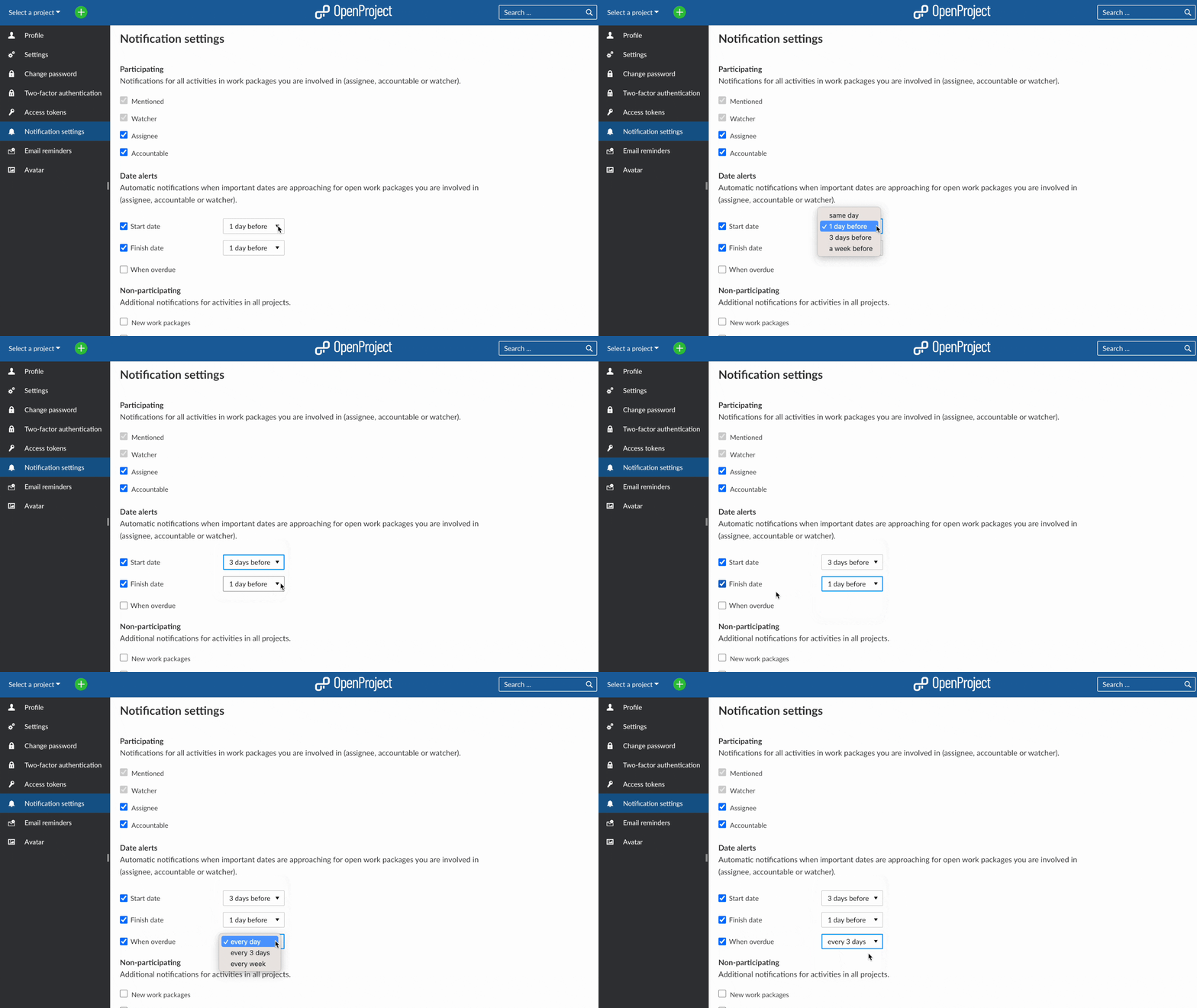
Please note that you are always notified for activities in work packages that you are mentioned in or of which you are being a watcher. You are also automatically notified if you are an assignee or accountable of a certain task, but may uncheck the boxes here.
Watch a video to learn about all OpenProject’s notifications and reminder features:
Este vídeo está actualmente disponible solo en inglés.
Your benefits with date alerts for deadline management
- no more risk of missing a deadline
- generally more relaxed work
- proactive task and project planning
- risk migration: identify potential risks and bottlenecks in advance
- improved communication
- efficient resource management that maximizes productivity
Help us improve deadline management even more
The date alerts feature made collaborating on projects a lot more organized and stress-free. But there is always room for further improvement! At OpenProject, we continuously work on improving the software. So let’s hear your ideas: Are you already working with date alerts? What experiences have you had and what would make your deadline management even better in the future? Tell us by simply adding a new feature work package here.
Before adding a new work package, please use the search bar in the header navigation on top or filter to look for similar feature requests. Read how to voice your opinion on what to build next: Submit feature idea