OpenProject 17.0: Colaboração em documentos em tempo real e muito mais
Foi lançado o OpenProject 17.0, e apresenta várias melhorias importantes em toda a plataforma. Neste artigo, destacamos as alterações mais importantes, e o que significam para o seu trabalho diário.
Dado que se trata de uma versão importante com muitas atualizações, focamos apenas os principais destaques. Para uma síntese completa de todas as funcionalidades, alterações e correções de erros, consulte as nossas notas de versão.
Uma rápida navegação no artigo:
-
Melhores reuniões, menos despesas gerais: Modos de rascunho e apresentação, resultados e iCal
-
Página inicial do projeto redesenhada e seleção de modelos melhorada
-
Programas e carteiras para a estruturação estratégica (complemento Enterprise)
-
Integração atualizada do SharePoint com permissões mais restritivas (complemento Enterprise)
Pensar em conjunto, criar em conjunto: Colaboração em documentos em tempo real
Ideias, decisões e acordos do projeto são frequentemente definidos de forma conjunta. Ao mesmo tempo, tendem a estar espalhados por diferentes ferramentas e ficheiros. Isto dificulta a manutenção do contexto, o alinhamento da equipa e a ligação do conteúdo escrito ao trabalho real do projeto.
Com o OpenProject 17.0, as equipas podem colaborar em documentos em tempo real, diretamente no OpenProject. O que significa isto? - Vários utilizadores podem editar um documento em simultâneo e ver as alterações uns dos outros instantaneamente. Ajuda as equipas a desenvolver ideias em conjunto, a alinhar os conteúdos e a manter tudo disponível de forma centralizada.
Esta abordagem central funciona particularmente bem porque a maioria dos documentos está intimamente ligada às suas tarefas e projetos. Pode referir marcos e ligar pacotes de trabalho, facilitando a passagem de um rascunho de texto partilhado para um plano de projeto exequível. Isto é especialmente útil para documentos relacionados com projetos, tais como conceitos, contratos, especificações ou documentos de planeamento, onde a colaboração e o acompanhamento são importantes.
É bom saber: O novo módulo Documentos foi concebido com base no BlockNote, um editor de texto moderno e de código aberto que também é utilizado noutros projetos europeus de código aberto, como LaSuite e openDesk. Isto cria uma base sólida para futuras funcionalidades de colaboração no OpenProject.
Importante
A colaboração em tempo real em Documentos está disponível imediatamente para todos os planos que usam OpenProject na nuvem ou instalações locais com Docker Compose, Kubernetes ou Helm. Para instalações baseadas em pacotes, a comunicação em tempo real tem de ser configurada separadamente. Também é relevante para instalações locais que utilizam pacotes: A fonte do pacote foi alterada para packages.openproject.com.
Para mais informações sobre as decisões de design, os antecedentes técnicos e o que está planeado para o futuro, leia este artigo do blogue.

Melhores reuniões, menos despesas gerais: Modos de rascunho e apresentação, resultados e iCal
As reuniões são essenciais para coordenação e tomada de decisões, mas muitas vezes, a preparação das agendas, a orientação dos debates e a documentação dos resultados exigem um esforço manual suplementar. Isto pode fazer com que as reuniões pareçam fragmentadas e os resultados sejam difíceis de acompanhar.
O OpenProject 17.0 melhora os fluxos de trabalho das reuniões ao apoiar as equipas antes, durante e depois de uma reunião, ajudando a manter tudo estruturado num único local. Mais informações sobre a gestão de reuniões com o OpenProject no nosso guia do utilizador.
Planear uma reunião: Modo de rascunho
No modo de rascunho, as agendas podem ser criadas e aperfeiçoadas de forma colaborativa, sem notificar os participantes demasiado cedo. Isto permite que os moderadores se alinhem internamente antes de abrir a reunião e a partilhar com todo o grupo.

Executar uma reunião: Modo de apresentação
Uma vez iniciada a reunião, pode ser desafiante manter os debates concentrados. O Modo de apresentação ajuda os moderadores a guiar os participantes pela ordem de trabalhos, passo a passo, facilitando a manutenção do foco e assegurando que todos os pontos são abordados pela ordem correta.

Documentar os resultados: Resultados múltiplos
A recolha de resultados é tão importante como a realização da própria reunião. As reuniões podem agora incluir múltiplos resultados baseados em texto, facilitando o registo de decisões, acordos ou próximos passos diretamente no local certo. Estes resultados permanecem na documentação da reunião, e podem ser revistos mais tarde.

Fique a par: subscrição iCal
Para apoiar o acompanhamento e o planeamento, as reuniões também podem ser inscritas através do iCal, permitindo que os participantes se mantenham informados sobre os horários e as atualizações nas suas ferramentas de calendário pessoais.
Em conjunto, estas melhorias ajudam as equipas a realizar reuniões mais eficientemente, a manter as discussões estruturadas e a garantir que os resultados são documentados claramente e estão acessíveis.
Estruture os projetos de forma consistente: Página inicial do projeto redesenhada e seleção de modelos melhorada
Criar projectos de forma consistente é essencial, especialmente para organizações que trabalham com normas de projeto definidas, como PM² ou PMflex. Na prática, a informação do projeto está muitas vezes espalhada por diferentes vistas, e a configuração do projeto pode ser propensa a erros, particularmente para administradores não técnicos.
O OpenProject 17.0 apresenta uma página inicial de projeto redesenhada, agora dividida em dois separadores dedicados. Desta forma, é mais fácil distinguir entre informação de alto nível sobre o projeto e detalhes operacionais, e ajuda as equipas a compreender a estrutura de um projeto num relance. Tenha em atenção que, para além da remodelação, o nome da página síntese do projeto foi alterado para início do projeto.

A criação de projetos também foi melhorada. Uma seleção de modelos mais clara guia os utilizadores através do processo de configuração e ajuda a evitar erros comuns, mesmo quando os projetos são criados por utilizadores sem conhecimentos técnicos profundos.
Criação de “Novo projeto” do OpenProject que apresenta vários modelos pré-criados à sua escolha, incluindo um “Projeto em branco” selecionado. Abaixo encontra botões para “Cancelar” e “Continuar”](openproject-17-0-templates.png){: .image-screenshot }
Nota
Estas melhorias lançam as bases para um assistente planeado de criação de projetos em várias etapas numa das próximas versões. O próximo assistente visa apoiar a criação e o processamento de artefactos PM² / PMflex de uma forma guiada e fácil de utilizar. Tencionamos publicar em breve um artigo de antevisão sobre esta funcionalidade no nosso blogue.
Gerir projetos a nível estratégico: Programas e carteiras (complemento Enterprise)
Muitas vezes, à medida que as organizações crescem, gerir projetos de forma isolada deixa de ser suficiente. Os objetivos estratégicos, as dependências e as prioridades têm de ser visíveis em vários projetos, e não apenas dentro deles.
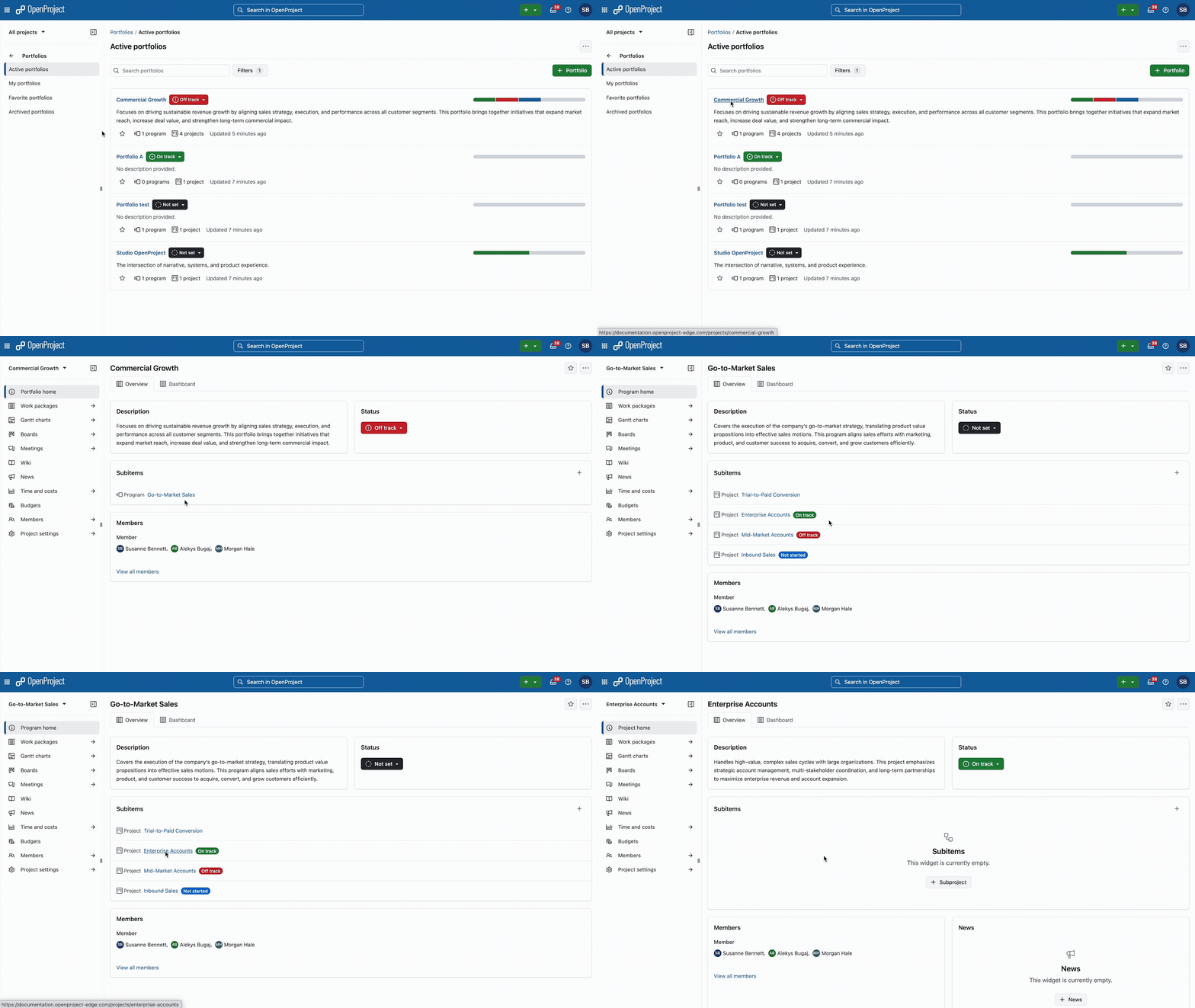
Com programas e carteiras, o OpenProject 17.0 ajuda as organizações a estruturar projetos a um nível mais elevado. Os projetos relacionados podem ser agrupados em programas e carteiras, para apresentar uma síntese de todas as iniciativas em curso. Desta forma, é mais fácil alinhar o trabalho com os objetivos estratégicos, acompanhar o progresso dos projetos, e apoiar a tomada de decisões informadas.

Isto é particularmente útil para as organizações que trabalham com PM² ou PMflex, onde os projetos estão inseridos num contexto estratégico mais amplo, e precisam de ser geridos de forma consistente em carteiras e programas. PMOs, as equipas de gestão e as organizações do sector público, beneficiam de maior transparência sem aumentar a complexidade do trabalho diário do projeto.
A funcionalidade está disponível como complemento Enterprise no plano Premium e integra-se perfeitamente nas estruturas de projeto existentes no OpenProject. Consulte o nosso guia do utilizador para mais informações sobre o módulo de carteira no OpenProject.
Mais controlo ao ligar o SharePoint: Integração atualizada do SharePoint (complemento Enterprise)
A partilha e colaboração de documentos entre sistemas é comum em muitas organizações, mas também levanta questões relacionadas com o controlo de acesso e a proteção de dados. Especialmente em ambientes regulamentados, é importante definir claramente quem pode ver e editar que conteúdos.
Com o OpenProject 17.0, a integração SharePoint/OneDrive existente foi dividida em duas integrações separadas. Isto permite um tratamento de permissões mais restritivo e mais claro ao ligar o conteúdo do SharePoint ao OpenProject.
As integrações atualizadas do SharePoint e do OneDrive estão disponíveis como complementos Enterprise no plano Professional, tal como antes da versão 17.0. Consulte o nosso guia de administração do sistema para mais informações sobre a integração do SharePoint e agora separada integração do OneDrive para o OpenProject.
Outras melhorias significativas
OpenProject 17.0 é uma versão empacotada. Para manter este artigo conciso, eis algumas melhorias adicionais que merecem destaque:
Acessibilidade melhorada
Os textos alternativos para imagens e as cores melhoradas dos gráficos tornam o OpenProject mais acessível e fácil de utilizar para todos. Consulte as nossas notas de lançamento para mais informações sobre as melhorias de acessibilidade.
Pesquisa global mais inteligente e sugestões automáticas mais precisas
A pesquisa global inclui agora contexto adicional, como o tipo e o estado, ajudando os utilizadores a encontrar conteúdos relevantes mais rapidamente. Como efeito secundário positivo, várias sugestões automáticas foram melhoradas para fornecer sugestões mais exatas e reduzir a ambiguidade na introdução de dados. Consulte as nossas Notas de lançamento para mais informações sobre uma pesquisa global mais inteligente e sugestões automáticas mais precisas.
Opções de privacidade do utilizador mais restritivas
A visibilidade do utilizador pode agora ser restringida de forma mais rigorosa para pessoas que não pertencem ao mesmo projeto, apoiando ambientes sensíveis à privacidade. Consulte as nossas Notas de versão para mais informações sobre opções de privacidade mais restritivas.
Textos de ajuda de atributos de projeto melhorados
Os atributos do projeto oferecem agora textos de ajuda mais claros com legendas e suportam uma edição mais direta, tornando a configuração do projeto mais fácil de compreender. Consulte as nossas notas de versão para mais informações sobre os textos de ajuda melhorados dos atributos de projeto.
Logótipo móvel personalizado (complemento Enterprise)
As organizações que utilizam o plano Enterprise Basic e superiores podem agora utilizar um logótipo personalizado na aplicação móvel OpenProject, para melhor refletir a sua marca. Consulte as nossas Notas de lançamento para mais informações sobre como adicionar um logótipo móvel personalizado.
Atributos necessários do projeto
Os projetos podem agora impor atributos necessários, ajudando a garantir dados de projeto consistentes e completos. Consulte as nossas notas de versão para mais informações sobre os atributos de projeto necessários.
Nova permissão para exportar projetos
Uma permissão dedicada permite agora aos administradores controlar quem pode exportar dados de projetos.
OpenProject 17.0: Migração, instalação, atualizações e apoio
Siga o guia de atualização para a instalação em pacote ou instalação Docker para atualizar a sua instalação do OpenProject para o OpenProject 17.0. Atualizámos os seus ambientes OpenProject alojados (nuvem empresarial) a 14 de janeiro de 2026.
Encontrará mais informações sobre todas as novas funcionalidades e alterações nas nossas Notas de lançamento ou na Documentação do OpenProject.
Se necessitar de apoio, pode colocar as suas questões no Fórum da comunidade ou, se for elegível para apoio empresarial, contacte-nos e teremos todo o gosto em dar-lhe apoio pessoalmente.
- Novo no OpenProject? Para testar imediatamente todas as funcionalidades do OpenProject 17.0, crie uma instância de avaliação gratuita de 14 dias do nosso OpenProject Enterprise na nuvem.
- Prefere executar o OpenProject 17.0 na sua própria infraestrutura? Aqui pode encontrar as Diretrizes de instalação do OpenProject.
- Quer atualizar a partir de uma versão Community para experimentar os complementos Enterprise? Obtenha um token de teste gratuito de 14 dias para testar os complementos empresariais (todos os planos).
Créditos
Um agradecimento muito especial a Helmholtz-Zentrum Berlin, à cidade de Colónia, à Deutsche Bahn e à ZenDiS pelo patrocínio de funcionalidades lançadas ou futuras. O seu apoio, juntamente com os esforços da nossa fantástica Community, ajuda a impulsionar estas inovações. Além disso, um grande agradecimento aos membros da nossa comunidade por reportarem erros e nos ajudarem a identificar e a fornecer correções. Agradecimentos especiais a Alexander Aleschenko, Stefan Weiberg e Markus Preisinger pelos bugs encontrados e reportados.
Por último, mas não menos importante, estamos muito gratos aos nossos colaboradores de tradução no Crowdin, que traduziram bastante texto do OpenProject! Nesta versão, gostaríamos de agradecer especialmente aos seguintes utilizadores:
- stenberg.thomas, por um grande número de traduções para sueco.
- natalianikolaieva1803, por um grande número de traduções para ucraniano.
- Sharmin, por um grande número de traduções em persa.
Gostaria de ajudar nas traduções? Dê uma vista de olhos ao nosso guia de tradução e descubra como pode contribuir. Agradecemos muito!
Como sempre, agradecemos todos os comentários sobre esta versão.